For Power BI and Fabric semantic models

Open a model. Follow it from the Plan to Publish.

Semanticus is a workbench for semantic models inside VS Code. It follows the path your work already takes: see what needs doing, understand the model, change it, check it, and publish only what you meant to.

  1. PlanWhat needs doing
  2. ExploreHow it fits together
  3. EditChange it safely
  4. ReviewCheck the numbers
  5. PublishOnly what you meant

Dots show who usually works at each step: you, Semanticus and your assistant.

  1. 1Plan
  2. 2Explore
  3. 3Edit
  4. 4Review
  5. 5Publish

One made-up model, Contoso Retail, goes all the way through.

1 of 5 · Plan

See what needs doing, and who is doing it.

The Plan is where every piece of work lives. Semanticus lists what it found, you add tasks in your own words, and your assistant takes the ones you give it. Changes wait here for you, and History records every author.

  • FindingsFrom Model quality and other checks
  • TasksTyped by you, owned by anyone
  • ChangesBefore and after, keep or drop
  • HistoryWho did what, and Undo

You add a taskYour assistant takes it

Pro: Semanticus ranks the Plan and runs steps you allow.
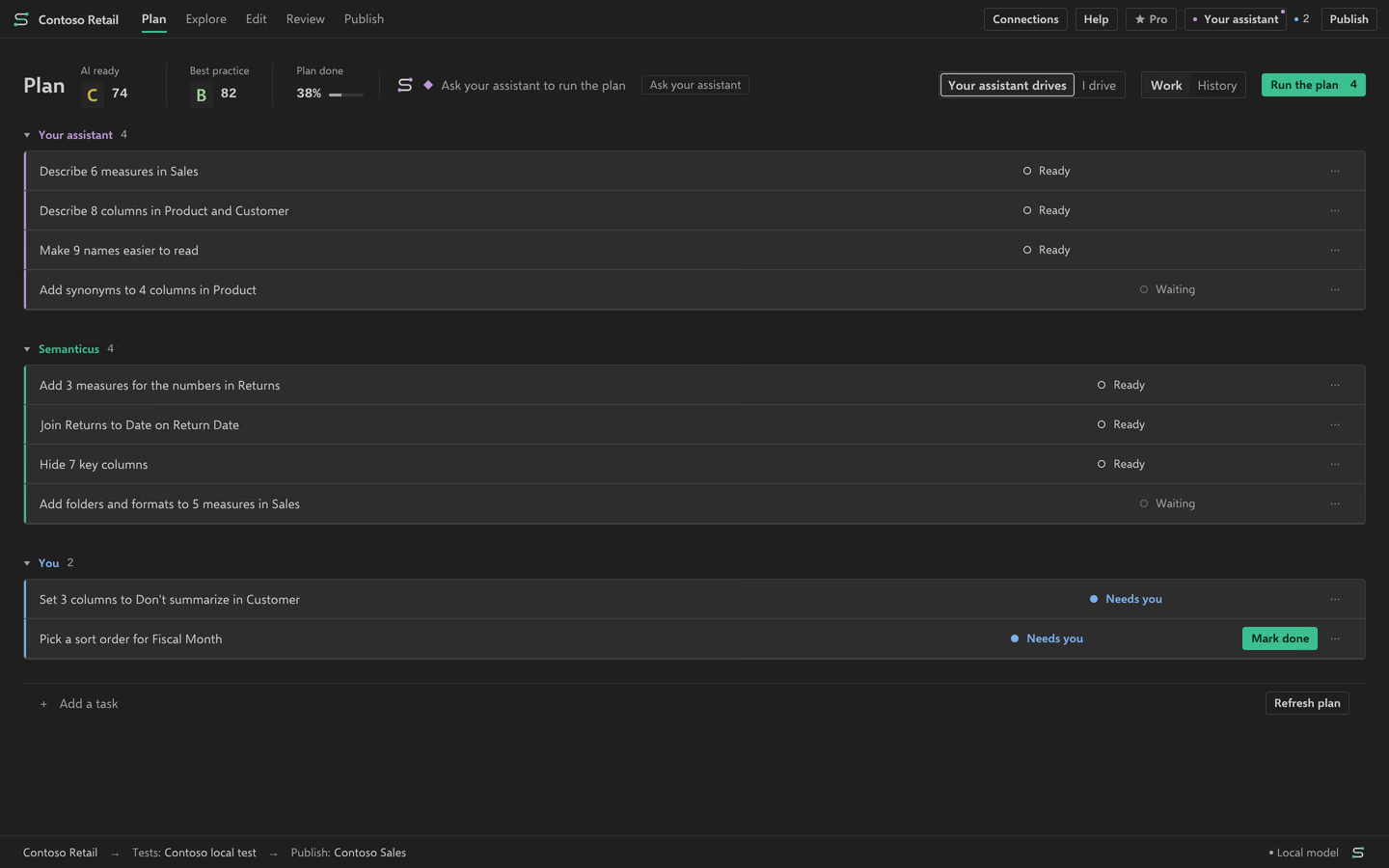
Semanticus· PlanContoso Retail
Populated Pro Plan with all three workers
Populated Pro Plan with all three workers. Read the guide.
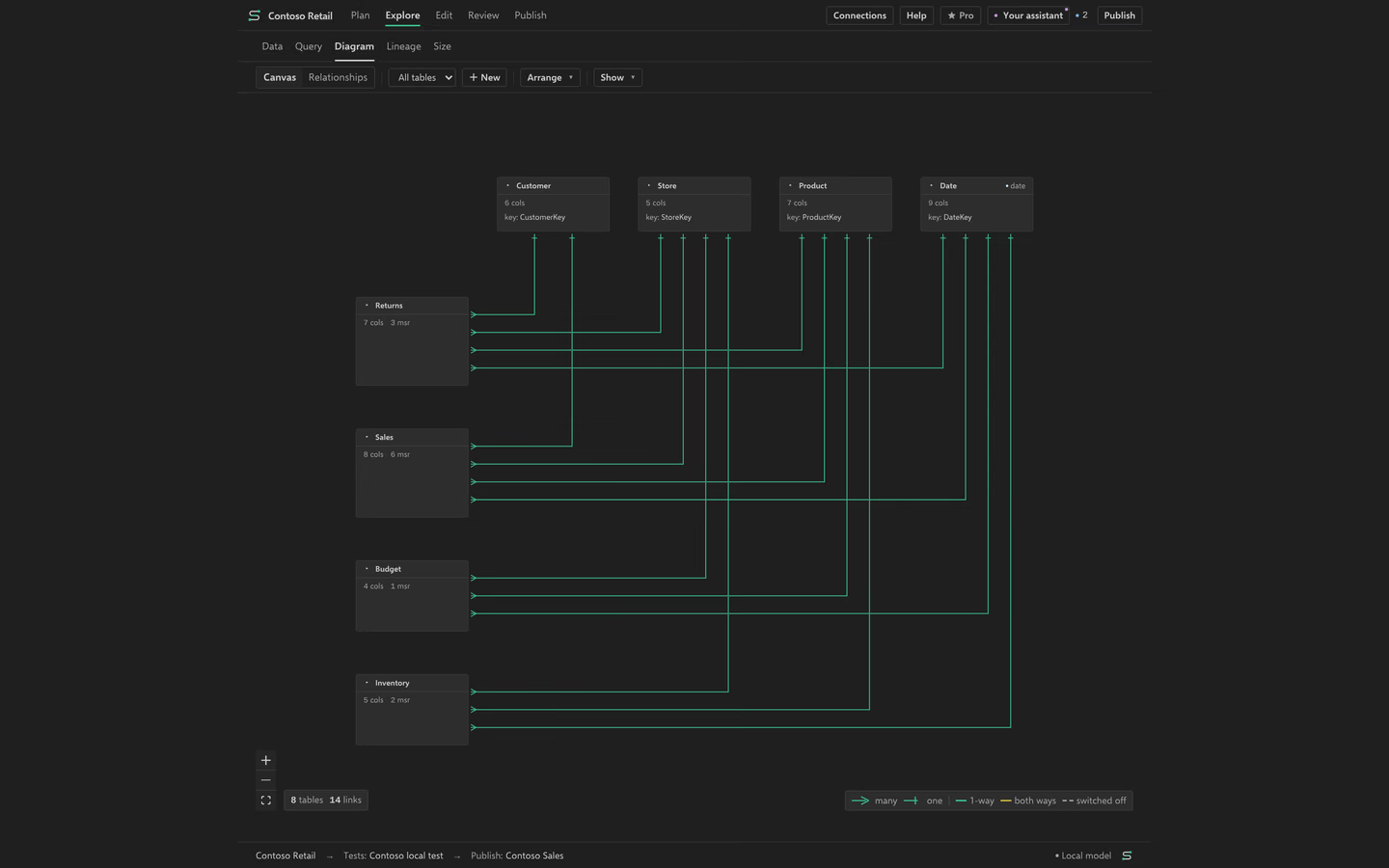
2 of 5 · Explore

Understand the model before you touch it.

See how tables connect, what depends on a column, which rows sit in a table, and where the memory goes. Lineage tells you which reports it checked and which it could not read.

  • DiagramTables and relationships
  • LineageWhat a change could affect
  • DataA bounded live row preview
  • Size by tableMeasured memory use

Pro: Ask your data, with the reading it chose shown so you can switch it.

Semanticus· ExploreContoso Retail
Star schema with shared dimensions
Star schema with shared dimensions. Read the guide.
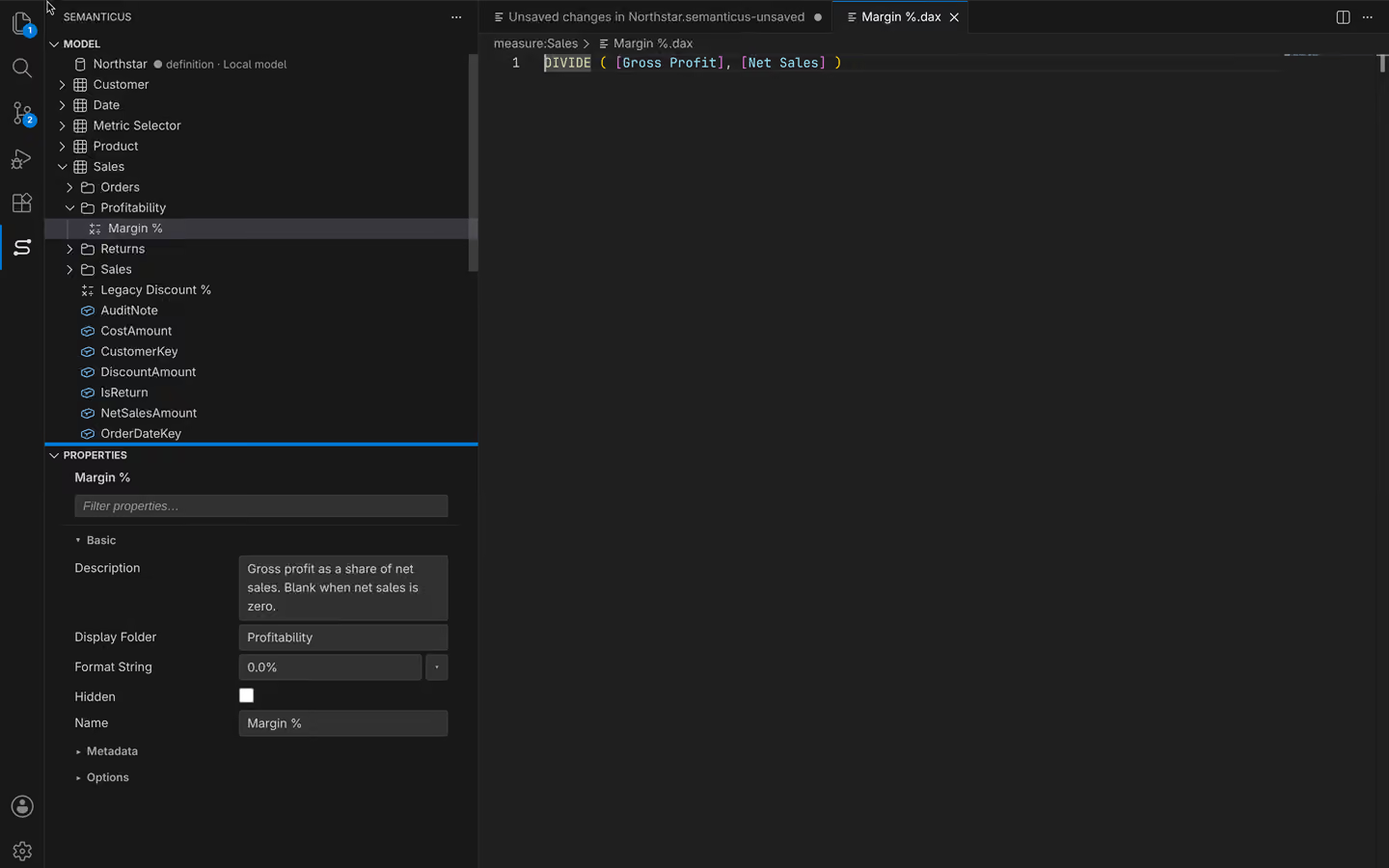
3 of 5 · Edit

Change it by hand, or hand it over.

Edit a measure, rename across the model with a preview, try a calculation in Queries, or change a Power Query step. Every DAX write is checked. History lets you inspect and undo recorded edits.

  • PropertiesEvery object and setting
  • Find and replaceWith a preview first
  • QueriesResults and performance breakdown
  • AI instructionsAnd Model notes

Your assistant edits in the same session.

Semanticus· EditContoso Retail
Measure edit with reviewed field values
Measure edit with reviewed field values. Read the guide.
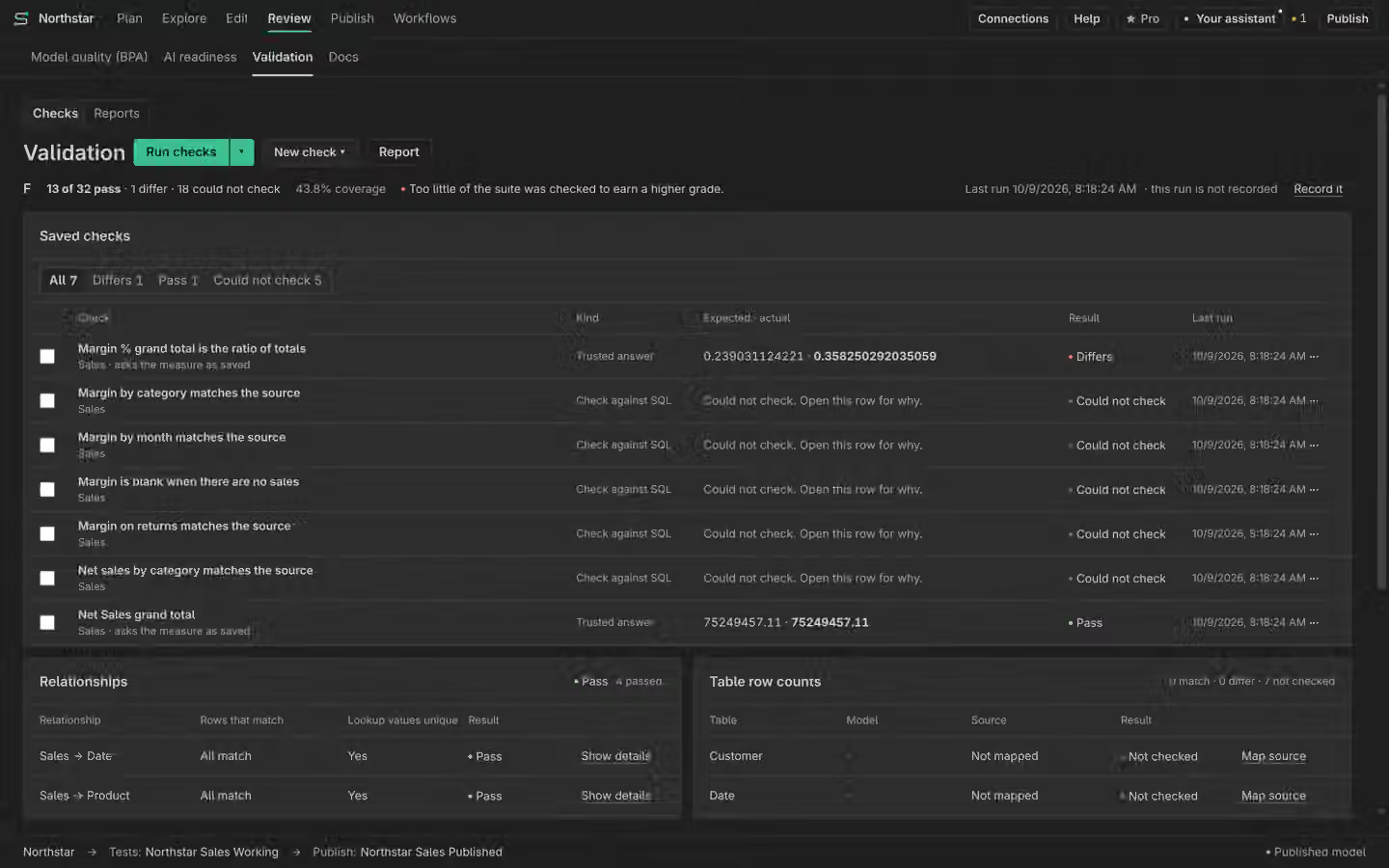
4 of 5 · Review

Check the numbers before anyone else sees them.

Compare results with answers you trust, find model issues, and see how clearly AI can read the model. When Semanticus cannot check something, it says so. Unknown is not a pass.

  • ValidationPass, differs, could not check
  • Model qualityFindings you fix or accept
  • AI readinessA metadata score, with its limits
  • ReportsA record of each run
Semanticus· ReviewContoso Retail
Pass, Differs and Could not check results
Pass, Differs and Could not check results. Read the guide.
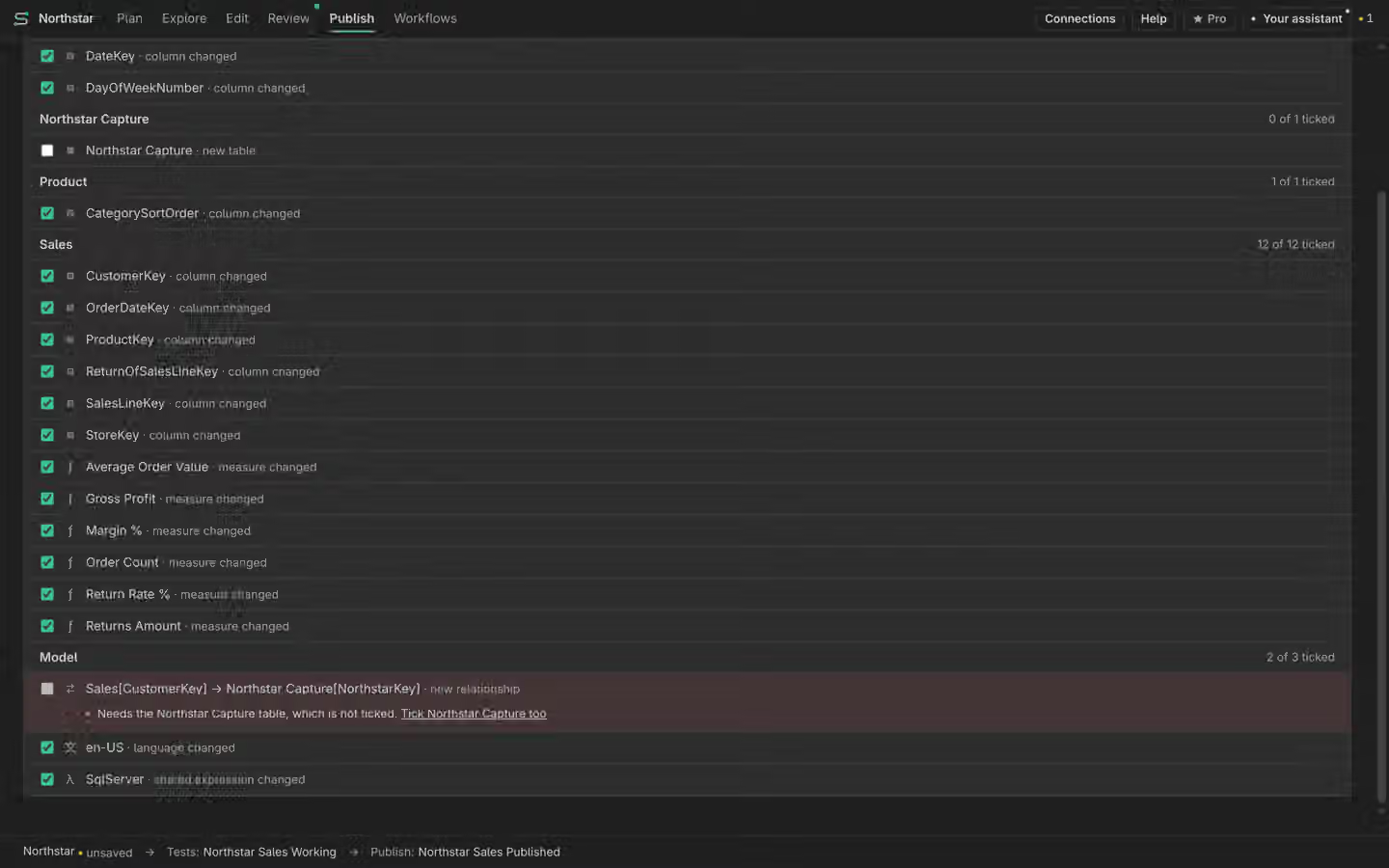
5 of 5 · Publish

Publish only what you meant to.

Pick the destination, see the exact difference, clear anything that blocks it, then confirm. Each publish keeps a version you can roll back to.

  • PreviewThe exact difference
  • BlockersShown before you confirm
  • Published versionsRoll back with a preview
  • CompareAny two models

Review the destination and confirm the exact write.

Semanticus· PublishContoso Retail
Destination preview and a blocker
Destination preview and a blocker. Read the guide.

Where Pro joins the journey

Manual work is free. Pro adds Semanticus deciding and doing work for you, for models you allow.

AreaFreePro adds
PlanFindings in rule order, tasks, changes, History and UndoA ranked Plan and runs of ready Semanticus steps
ExploreDiagram, Lineage, Data and Size by tableAsk your data
EditManual tools and reviewed bulk fixesAdvice choices you allow for this model
ReviewValidation, Model quality, AI readiness and ReportsUse the Plan to follow permitted work
PublishPreview, confirmation, published versions and CompareThe same reviewed write boundary

Free

No subscription

Do the work yourself or with your own assistant.

  • Every manual tool and reviewed bulk fix
  • Validation, Model quality and AI readiness
  • History, Undo, Reports and confirmed publishing
  • No AI inference by Semanticus on Free
Install

Pro

USD 10 a month · USD 100 a year

Semanticus decides and does permitted work for you.

  • A ranked Plan and runs of ready steps
  • Ask your data
  • Jev advice, with permission for each model
Get Pro inside the app

Start at step one

Install Semanticus, open a model and look at its Plan. Some model sources need Windows x64.