AI-Readiness
The flagship tab. It grades the open model from A to F for how well AI consumers (Copilot, Q&A and Fabric data agents) can answer questions from it, then turns every gap into a fix you can apply. Available in the Studio and over MCP, on the same live model.
A model can render its reports perfectly and still fail an AI consumer, because Copilot and data agents read the things a chart never shows: descriptions, unambiguous names, synonyms, a linguistic schema, documented relationships and the Prep-for-AI settings. AI-Readiness scores exactly those properties and tells you which ones to fix first.
#In the Studio
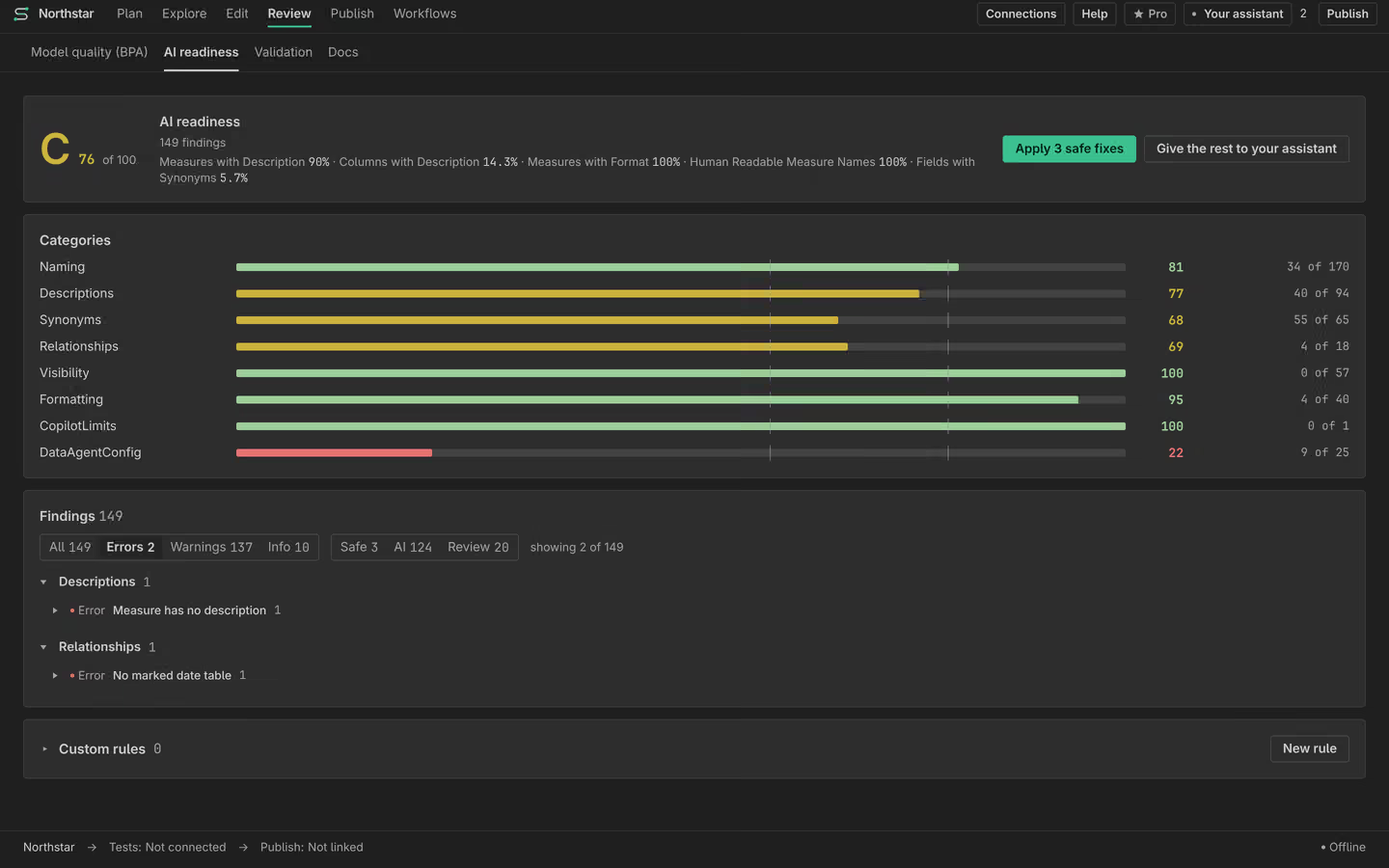
The AI-Readiness tab opens on the scorecard: an overall grade and a score out of 100, the per-category scores, the coverage KPIs and any gating reason, then a prioritized findings list grouped Category to Rule to Items. Each finding carries a severity and a fix badge, and the ones with a deterministic fix are click-to-fix inline. A readiness-trend sparkline tracks the score as you work, and any finding can be right-clicked to reveal the object in the Model tree or copy its reference.
#Over MCP
Your own Claude Code drives the same analyzer through three tools. Start with the cheap summary on a large model, then pull only the findings you intend to act on.
ai_readiness_summary # cheap overview: grade + per-category scores + counts
ai_readiness_scan category=Descriptions # full findings, filterable by category / severity
ai_readiness_scan severityMin=High
ai_readiness_scan_live # adds the live cardinality / Q&A-scale rules
ai_readiness_summary returns the grade, the per-category score / applicable / violations,
the coverage KPIs and the counts by severity and fix-kind without the (potentially large) findings list.
ai_readiness_scan returns the findings themselves, filtered by category,
severityMin or maxFindings (the score and counts are always for the full
model; only the returned list is filtered).
ai_readiness_scan_live is the same scan plus the rules that need live data: it reads
per-column distinct-value counts from the attached connection and applies the Q&A index rules, so the
scale and cardinality categories are graded too. It needs a live connection (connect_xmla or
connect_local) and stays read-only.
#The category scorecard
The overall grade is a weighted roll-up of scored categories such as Naming, Descriptions, Relationships, DataAgentConfig and BestPractice. Two hard gates sit above the arithmetic, because some problems are not "a few points off":
- A model that exceeds the documented Q&A scale ceiling is capped at a D
(rule
LIMIT-SCALE): beyond that ceiling, Copilot and Q&A start dropping values. - When more than half of your objects have no description, the score is capped at 69: an AI consumer cannot reason about fields it has no words for.
#Honest scoring: no fake 100s
Every rule scores only the population it actually evaluates. A foreign-key visibility rule scores foreign-key columns, not all columns, so a handful of violations among hundreds of unrelated fields cannot dilute to a near-perfect result. When a rule does not apply to your model at all, its applicable population is zero and it stays dormant: it drops out of the category average rather than inflating it. The design is dormant-or-dock. A category can only reflect real, applicable violations, never an always-pass 100.
#Findings and fixes
Every finding is tagged with how it is fixed, and every finding is fixable, either deterministically or by you (with grounding).
| Fix kind | What it means | How to apply it |
|---|---|---|
| SafeFix | A deterministic, low-risk change (hide a foreign-key column, set SummarizeBy to None on a key, set a geographic data category). | apply_fix for
one finding, or apply_safe_fixes for all of them in one undoable batch. |
| AiContent | Content only you can author well: a business description, a clearer name, synonyms, AI instructions. | get_fix_prompt for grounding, then
set_description / set_synonyms / set_ai_instructions /
enable_qna / set_ai_data_schema. |
| Proposal | A change that should be reviewed before it lands (for example a rename that report bindings may depend on). | Reviewed and approved in a change plan, never applied silently. |
To do the whole pass at once, make_model_ai_ready applies every deterministic safe fix and
then returns the new scorecard alongside a prioritized AI-content work queue, each item carrying the
finding plus grounding (the DAX, the owning table, sibling names) so the authored text is accurate. Work
the queue, then re-scan.
Scoring, findings and single fixes are free. The one-click bulk paths (apply_safe_fixes,
make_model_ai_ready) and model-wide rule-level waivers are Pro. See
Pro for what the bulk engine adds.
#Waivers, honestly
Some findings are decisions, not defects ("we keep these unused columns on purpose").
waive_finding accepts a finding so it stops counting against the score, but honestly: a
reason is required, the waiver is recorded on the model with who and when, and the finding is still
surfaced (tagged waived, with its reason) while the scorecard reports a waived count. Waivers never lift
the hard gates. A per-instance waiver is free; waiving an entire rule model-wide is the Pro bulk lever.
list_waivers shows the audit trail and unwaive_finding reinstates one.
#Where the rules come from
The analyzer is built from a catalog of 192 fact-checked Microsoft requirements for how AI reads a model. The deterministic ruleset that scores automatically is growing toward covering the full catalog (a 1.0 goal); the remaining requirements are tracked in the project's living backlog, and rules are added only when they can be detected precisely enough to avoid false positives.
Curious how real models score? We scanned 40 public semantic models and the median grade was an F. The full method, corpus and raw scores are on the benchmarks page.
Semanticus