 Semanticus
Best Practice
A typed Best Practice Analyzer over your live model: it scans for the classic modeling problems (performance, DAX, formatting, naming, layout), fixes the deterministic ones in one click, and lets you load or write your own rules. Available in the Studio and over MCP.
Where AI-Readiness is the AI-consumption lens, the Best Practice Analyzer (BPA) is classic model hygiene: the things that make a model fast, correct and maintainable for people. The two run side by side and complement each other. Semanticus ships the canonical Power BI standard ruleset as the default and merges any rules embedded in the model.
#In the Studio
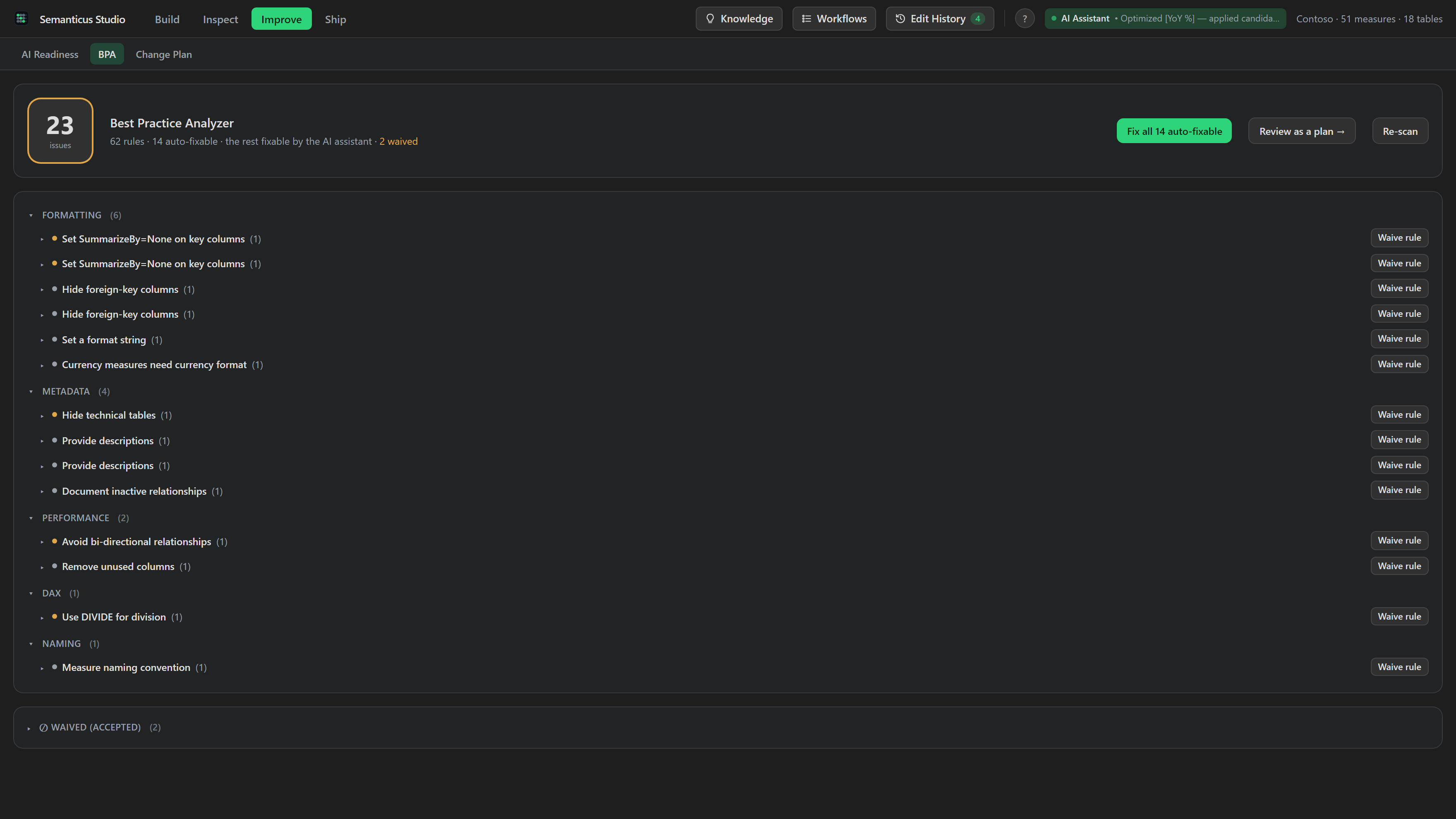
The Best Practice tab lists violations grouped Category to Rule to Items, each with its severity and the offending object. Violations that can be fixed deterministically are flagged auto-fixable and can be fixed in place; the rest carry a remediation prompt so you can fix them with the right editor. Right-click any item to reveal the object in the Model tree or copy its reference.
#Over MCP
Your own AI Assistant runs the same engine. On a large model, start with the summary, then filter.
bpa_summary                            # rule count + violation counts by category / rule / severity
bpa_scan category=Performance          # the violations themselves, filterable
bpa_scan autoFixableOnly=true          # only the ones with a deterministic fix
bpa_fix <ruleId> <objRef>               # fix one violating object
bpa_fix_all                            # every deterministic auto-fix in one undoable batch
bpa_summary returns the rule count, the total violation count, the auto-fixable count and
the counts by category, rule and severity without the (potentially large) list. bpa_scan
returns the violations, filtered by category, ruleId or
autoFixableOnly. The counts are always for the full model; only the returned list is
filtered.
#Fixing violations
Deterministic fixes are literal property changes (a bidirectional relationship set to single, a key
column's SummarizeBy set to None). bpa_fix applies one and bpa_fix_all applies
every deterministic fix in a single undoable batch. Destructive method-call fixes are refused by design.
For everything else, bpa_get_fix_prompt returns a remediation instruction with the rule and
object context, so the fix is made with the correct tool (set_description,
set_measure_format, update_measure or rename_object). Every rule is
fixable: deterministically, or by you with the right prompt.
Scanning and single fixes are free. The one-click bpa_fix_all batch and model-wide
rule-level waivers are Pro. See Pro.
#Your own rules: load them, or write them here
Bring your team's standards with you. load_bpa_rules loads rules from a file path, an
http(s) URL or inline JSON in the standard rules schema. They layer on top of the bundled Power BI
standard ruleset and are persisted on the model, so they travel with it and are undoable.
replace=false merges by id; replace=true sets the model's custom rules to
exactly that set. reset_bpa_rules clears them and reverts to the bundled ruleset.
You can also author a rule without leaving the tab. The Custom rules panel manages the rules embedded on the model and opens a New rule form with starter templates (a missing-property check, a naming pattern, and friends), scope and category dropdowns fed by the engine, and live validation as you type through the engine's real expression parser. Before you save, a labelled test run against the open model shows how many objects the rule applies to, how many it flags, and the first few names, so a rule never lands sight-unseen. An "Ask the AI Assistant for help" button copies a ready-to-paste authoring prompt, so your assistant can draft the expression and the same validation judges it. Violations from your rules are marked "(custom rule)" in the findings list, and waivers work on them unchanged. Authoring is free.
validate_rule kind="bpa" rules={...}   # compile + test-run against the open model, nothing saved
load_bpa_rules rules=[...]             # save onto the model (merge by id; undoable)
get_custom_rules                       # the custom rules of both kinds embedded on the model
Two honesty rules apply to everything custom: a custom rule can never override a bundled rule's id
(the load refuses and says so), and a rule that breaks later goes quiet and reports itself rather
than silently misfiring. The AI-Readiness tab has the same
panel for custom readiness rules, which additionally carry a scored category; one
validate_rule operation previews both kinds.
#Waivers, honestly
When a violation is a conscious choice, waive_finding (system bpa) accepts it
so it stops counting, but honestly: a reason is required, the waiver is stored on the model with who and
when, and the finding is still surfaced (tagged waived). A per-instance waiver is free and also writes
the ignore annotation that Tabular Editor honours; waiving an entire rule model-wide is the Pro bulk
lever. list_waivers is the audit trail and unwaive_finding reinstates a
finding. Waived BPA findings do not block the deploy gate, but they are counted so the picture stays
honest.
#See also
- AI-Readiness: the AI-consumption lens (descriptions, synonyms, Prep-for-AI), scored A to F.
- Edit History: every fix is tracked, tagged and undoable on the shared timeline.