 Semanticus
The two doors
Every capability in Semanticus ships twice: as a surface in the Studio UI, and as an MCP tool your own AI Assistant drives. Both operate the same live session, so you and the agent are never looking at two different pictures of the model.
#One model, two drivers
Most tools make you choose: a rich workbench where the AI can only chat from the sidelines, or a write API the agent can call with nowhere for a human to watch and veto. Semanticus is built the other way around. Every capability is reachable from both doors, on the same engine, the same session, the same change-bus and the same undo timeline.
You point, click and type: browse the model tree, edit DAX and properties, run queries, review a change plan, watch the agent work. Native VS Code where it fits, and a React webview for the rich Studio panels.
Your AI Assistant calls the same operations by name: create_measure, run_dax,
ai_readiness_scan, start_workflow and more. There is no capability behind a
door only one driver can open.
#Every edit broadcasts live
A change made through either door commits, then broadcasts a model/didChange event so the
other door repaints from the live truth. Each edit is tagged with its origin, human or agent, so you can
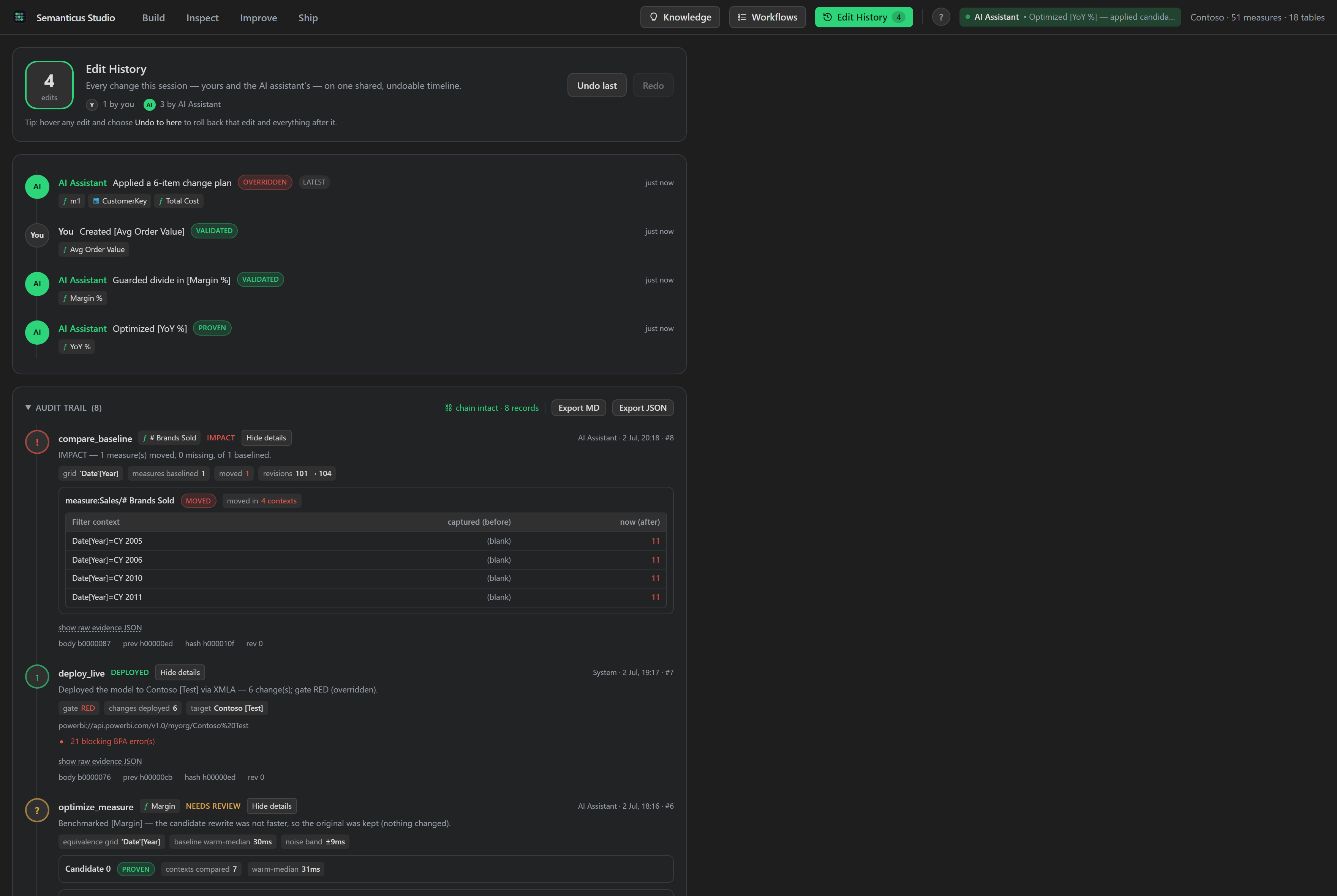
always see who did what. In the Edit History tab this reads as a
co-authoring timeline: every change is attributed to You or the AI Assistant, and you can undo back to any
point.
#One shared undo timeline
Because it is one session, it is one undo stack. Your edits and the agent's edits interleave on a single timeline, and undo walks back whoever's change was last. That is what makes an AI change safe to accept: if you do not like it, one undo reverts it, exactly as if you had made the edit yourself.
- Last-writer-wins, honestly. If both doors touch the same object, the later write is the final value and the change is visible to both drivers as it happens, never a silent merge.
- Coherent at every step. Each edit is one atomic transaction, so a reader on either door never sees a half-applied change.
#The same task, either door
Say you want a Margin measure on the Sales table. Here is the same job done through each door.
The result is identical: one undoable step that appears instantly in the other door, tagged with who made
it.
| In the Studio UI (you) | Over MCP (your AI Assistant) |
|---|---|
Select the Sales table in the model tree, add a measure, and type its DAX in the
editor: Margin = [Sales] - [Cost]. Save. |
Call create_measure with the table ref, the name Margin, and the
expression [Sales]-[Cost]. It returns the new object ref and is undoable. |
| The new measure appears in the tree and the properties grid immediately. | The edit broadcasts, so the Studio repaints and the measure appears in your tree, tagged
agent. |
Any single mutating op can be run through dry_run to see the exact change it would make,
with a guarantee of no mutation. It is plan mode for a single edit. See
the write chokepoint.
#Why this beats copy-paste AI
The alternative most people live with is copy-paste: the assistant works on a snapshot you pasted into a chat, proposes text, and you paste it back and hope it still fits. That is two pictures of the model, drifting apart with every exchange, and no undo that spans both.
Dual-drive removes the second picture. The agent reads and writes the same live model you are looking at, so it cannot drift from what you see, and every move it makes is one entry on the timeline you control. You get an assistant with real hands on the model, and a veto that is always one undo away.