 Semanticus
M Code
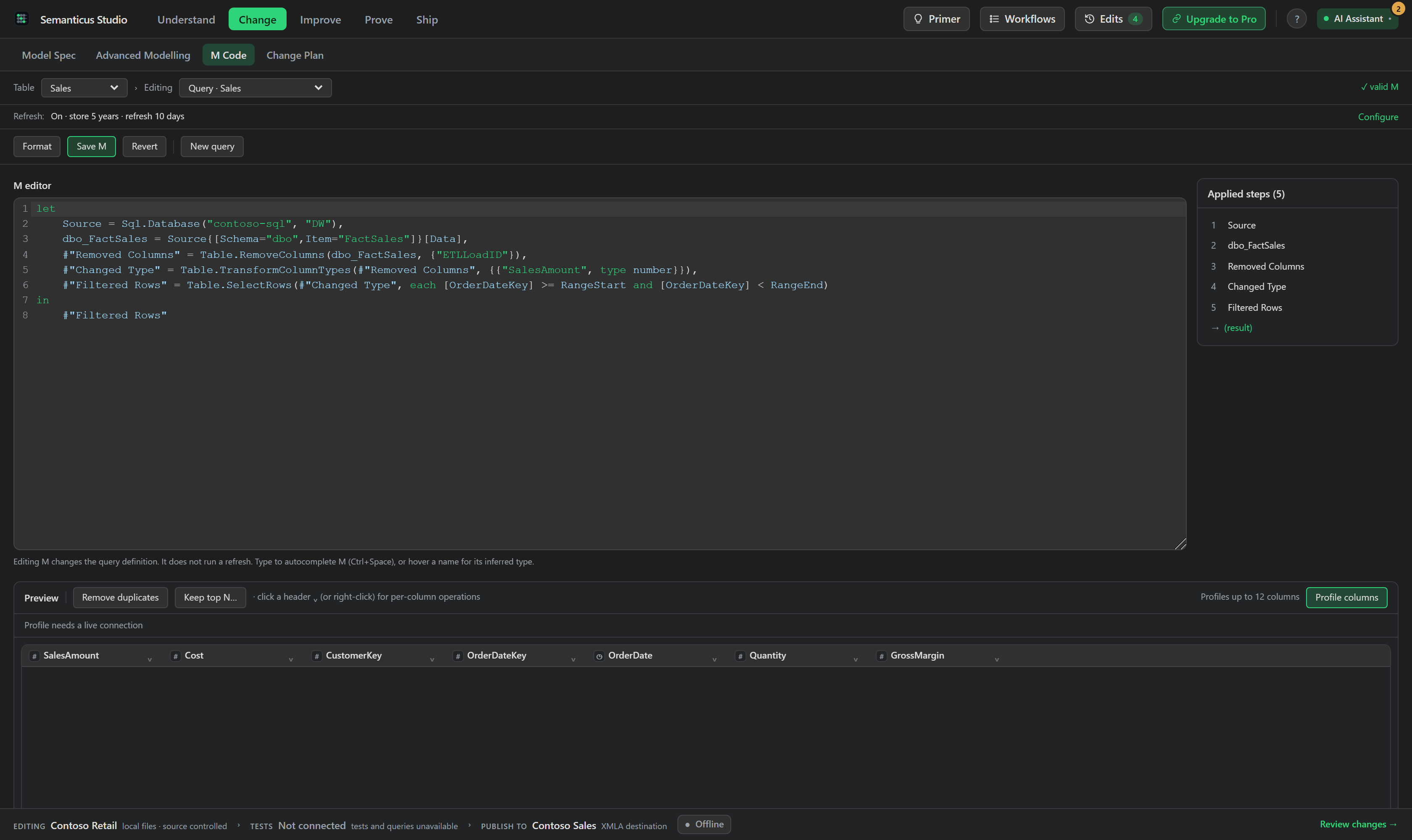
A real M editor inside VS Code, with standard-library autocomplete, inline diagnostics, interactive Applied Steps that write genuine M for you, and an incremental-refresh setup form. Author your queries here, and let your AI Assistant edit the same partition M over MCP.
#In the Studio
#Incremental refresh setup
The setup creates the required parameters and wires them into the selected query. Existing parameters are reused when they are compatible. The preview shows the complete change before it is applied, and the result is one undoable step.
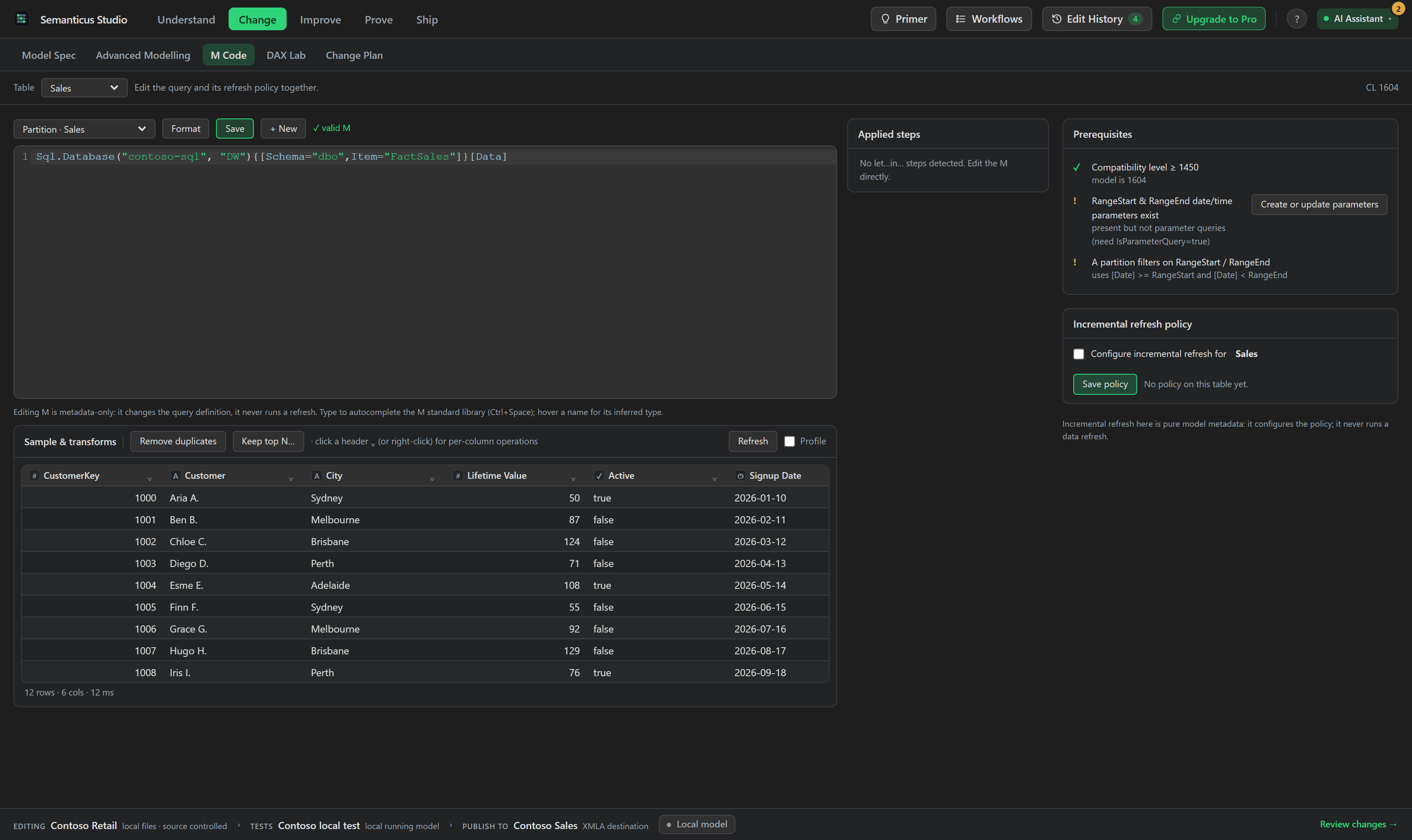
In 1.1.0 the tab is redesigned around a single Applied Steps rail beside the editor, a full-width preview, and a collapsible Incremental Refresh panel below. Every action shows its own keyed busy state and a progressive label, so one running action no longer blanks every button, and errors surface honestly inline. The editor is CodeMirror with M syntax highlighting, offline formatting, a validity strip and Save.
Autocomplete and hover types are backed by the full M standard library (866 symbols: Table.*,
List.*, Text.*, Sql.Database and the rest), vendored from
Microsoft's open-source M language tooling and running entirely in the webview. Inline diagnostics
squiggle syntax errors and duplicate identifiers as you type.
A transform bar and per-column menus write M for you: Remove, Rename, Change type, Filter rows, Replace values, Sort, Trim & Clean, Remove duplicates, and Keep top N. Each choice appends a correctly quoted step to the partition's M, and every generated step is parsed offline before it is written, so invalid M never lands. The Applied Steps outline is interactive: rename a step and every reference to it updates, delete one with re-point-to-predecessor semantics, or click a step to select its span in the editor. A profiling strip shows distinct and null counts and validity bars per column with an explicit lifecycle, idle, running with progress, per-column results that name a failure reason, and stale after a preview change until you refresh it by hand, and you can Duplicate or Reference a shared expression.
#Over MCP
The partition M, shared expressions and refresh policy are all dual-drive:
list_partitionslists a table's partitions;get_partition_mreads a partition's M source andset_partition_mreplaces it (both undoable and broadcast to the tab).- Shared, model-level M expressions and parameters are first-class:
list_named_expressions,get_named_expression,create_named_expressionandupdate_named_expression. The RangeStart and RangeEnd parameters show up here. - For incremental refresh,
get_incremental_refresh_policyreads the policy,set_incremental_refresh_policydefines or updates it, andremove_incremental_refresh_policyclears it.list_refresh_typesexplains every process option (Full, DataOnly, Calculate, ClearValues and the rest) in plain language.
list_partitions  table:Sales            # -> each partition's ref + mode
get_partition_m  <partition ref>        # -> the M source expression
set_partition_m  <partition ref>  "let Source = Sql.Database(...) in Source"
get_incremental_refresh_policy table:Sales # -> store N periods, refresh last M#Incremental refresh, set up safely
The Incremental Refresh lane is a form over the same policy API, with a live prerequisite checklist. Setting a policy is metadata only: it configures the refresh policy and never triggers a data load. The prerequisites are validated up front (the two parameters named RangeStart and RangeEnd, and a partition whose M actually filters the date column on them), so a policy is either complete or refused, never half-applied. On an existing policy you can change one knob and the rest is preserved.
There is no cross-platform engine that evaluates M, so Semanticus validates and formats M locally,
and the "Sample of loaded data" shows the loaded table (a read-only EVALUATE TOPN when
connected), not the output of each step. Your query evaluates when the model refreshes.