 Semanticus
Edit History
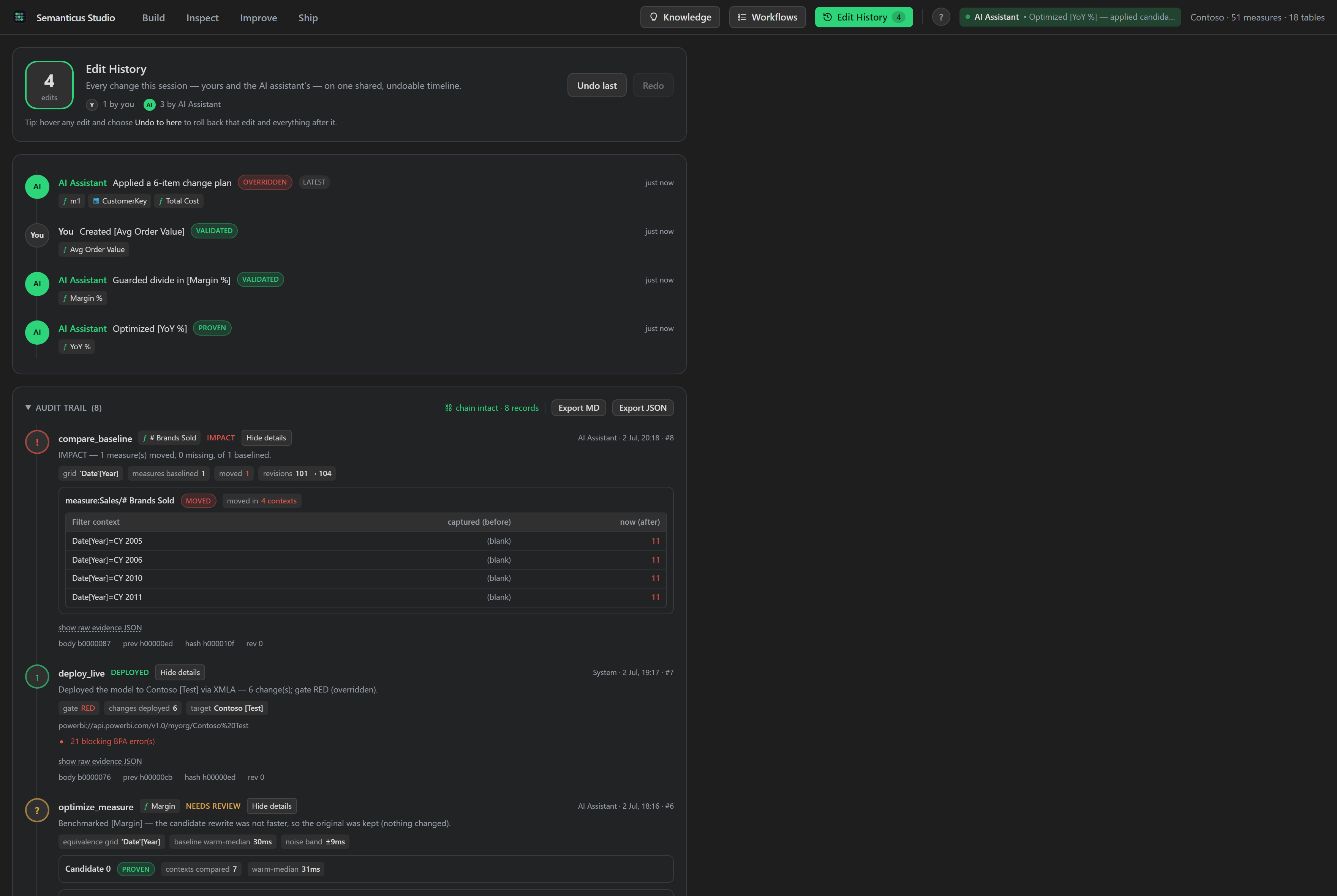
The co-authoring timeline. Every change to the model, from either door, is recorded and tagged with who made it, and you can undo back to any point. On top of that sits the Pro audit layer: verdicts with evidence for verified edits, accountable overrides with recorded reasons, all in a permanent record that no one, human or AI, can quietly rewrite.
Because the Studio UI and your AI Assistant edit one shared session, there is one history for both. The timeline is where you see what changed, who changed it, and, for the edits that were verified, the proof behind them.
#In the Studio
The Edit History tab is a timeline of every change with its label and revision, each entry tagged as your edit or the AI Assistant's, with an Undo to here action. When Verified Edits are recorded, the tab gains verdict badges welded to the matching timeline entries, an audit-trail section, a chain-integrity indicator and an export. The evidence expander renders typed evidence rather than a raw blob: an optimize run shows the candidate rewrites side by side with the winner highlighted, a baseline comparison shows the impacted measures with before and after values, and a batch apply shows its counts and the grade and BPA deltas.
#Durable source-control checkpoints
Session history is immediate and undoable. Source-control checkpoints add a durable marker that survives a restart. Create a named checkpoint before risky work, list the saved checkpoints, inspect the target, then restore explicitly. Checkpoint tests create their own repository and identity, so they do not depend on the machine's current branch, user name or working directory.
#Over MCP
undo_change                            # step back one entry on the shared timeline
redo_change                            # step forward one entry
list_verified_edits                    # the audit trail + its tamper self-check (free)
export_verified_edits format=md        # a shareable report for an auditor (Pro; json for CI)
get_verified_mode                      # is strict single-edit validation on?
set_verified_mode on=true              # turn it on (Pro) or off (always allowed)
blame_value measure:Sales/Margin       # what moved this number? (Pro)
list_value_history measure:Sales/Margin # the number's recorded values over time (Pro)#The shared undo timeline
There is a single undo timeline across both doors. undo_change reverts the most recent
change regardless of who made it, and the revert is live: it broadcasts to the UI immediately. A whole
batch (an apply_plan, a bpa_fix_all, a generator) undoes as one step, and
redo_change steps forward again. Making a new edit after an undo clears the redo stack.
#The Verified Edits audit layer
Verified Edits is a permanent audit trail persisted on the model itself, so it travels with the model
through reload, git and deploy, and it is built so history cannot be quietly rewritten: records are only
ever added, and each new record locks in the one before it (for the technically minded: a SHA-256 link
per record plus a head anchor holding the count and last hash). Edit, remove or reorder any past record
and the trail stops checking out: list_verified_edits reports whether it is intact and, if
not, the first broken sequence number. An undo from either door cannot erase a record, which is the one
sanctioned exception to the undo invariant. The trail records what matters: an optimize run's verdict and evidence,
a verified single-edit validation, a batch-apply certificate, and every deploy and override.
#Verified Mode
When Verified Mode is on, single-edit DAX operations (setting a measure's DAX, creating a measure,
calculated column, calculated table, calculation item or function) are strictly validated before they
commit: invalid syntax or an unknown table, column or measure reference is refused. It checks validity,
not equivalence. Turning it on is a Pro feature (it is the human's guarantee switch); turning it off is
always allowed. Read the current state with get_verified_mode.
#The accountable checkpoint
A live deploy runs the deploy-readiness gate first. If the gate is red, the deploy pauses with the blockers; shipping anyway takes an explicit override reason, which is recorded before the session is serialized and travels inside the artifact it authorized. It is never a hard wall on any door: the Studio and the MCP door both surface the blockers and accept a reasoned override, so the decision is documented rather than silent.
#What moved this number?
The timeline also remembers your numbers, not just your edits. At natural checkpoint moments (a batch apply, an optimize run, a live deploy, a save) the engine quietly records the values of your most important measures, so when a number looks wrong you can ask two questions the tab answers in plain language:
- This number over time: a small history chart of the measure's recorded values
across checkpoints (
list_value_history). Points where the value could not be observed (an offline session, a change that never touched this measure) show as honest gaps, never invented values. - What moved it (
blame_value): the change window in which the value moved, with the edits inside it. When exactly one recorded edit sits in the window, the movement is attributed to it and the changed formula is shown before and after. When several do, they come ranked by how much they touch the measure's dependencies, presented as candidates rather than a causal claim. When every formula is identical and the value still moved, the honest answer is that the data itself is the suspect, and the result says so. A one-click Show this edit jumps to the matching timeline entry, where "Undo to here" lives.
This is a Pro feature: the ambient value capture and both operations. On the free
tier nothing throws; the same questions are answerable by hand with capture_baseline and
compare_baseline, and the result tells you exactly how.
The co-authoring timeline, Undo to here, and reading the audit trail (list_verified_edits)
are free. Turning on Verified Mode, exporting the audit report, and the number time features
(blame_value, list_value_history) are Pro. See
Pro.