Model & Properties
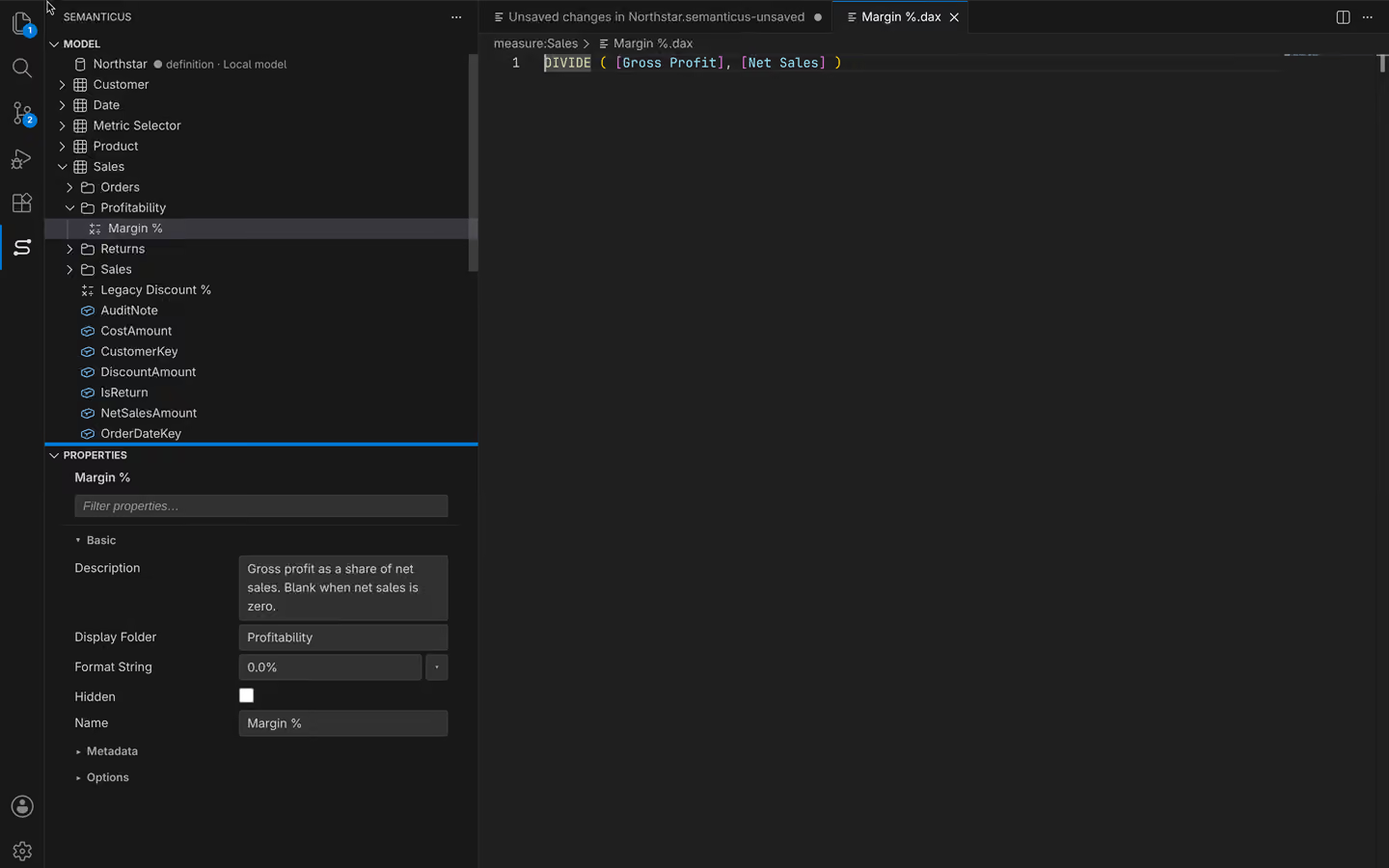
The model tree and the properties grid are the everyday surface of Semanticus: browse every table, measure, column and relationship, then edit names, descriptions, formats and any other property. It is the same live model your Claude reads and writes over MCP, on one shared undo timeline.
#In the Studio
The model tree is a native VS Code tree (not a webview), so it behaves like the rest of your editor. It expands to every object kind: each table, and under it that table's measures, columns, hierarchies and partitions, plus top-level folders for relationships, roles, perspectives and calculation groups (with their items).
A curated right-click menu over every object type does the common authoring jobs: create, script to DAX or TMDL, hide or show, and delete, with multi-select for bulk actions. Find in Model and Reveal in tree get you to an object fast, and you can mark a date table or generate a time-intelligence suite straight from the menu.
Selecting an object opens the Properties grid, a dedicated webview with typed editors (text, checkbox, number, dropdown), search and filter, collapsible categories, and multiline editors that grow as you type. Invalid input is flagged inline. Select several objects at once and the grid shows a tri-state, multi-select bulk edit, so one change lands on all of them. Editing an object's Name renames it and rewrites every DAX reference automatically, so a rename never leaves a broken measure behind.
#Over MCP
Your Claude walks the same tree and edits the same objects by name:
list_objectslists child objects: pass an empty ref to list tables, or a table ref (liketable:Sales) to list its measures and columns.get_objectreads an object's properties by ref, including its description and the authored metadata that answers questions like "does this table have a description?".get_propertiesreturns the same editable surface the grid shows (name, display name, category, kind, current value, enum options, read-only flag), andset_propertywrites one property back by name, taking the string form of the value (true/falsefor a checkbox, the enum name for a dropdown, the number for a numeric field).set_descriptionwrites a business description (keep it front-loaded and under ~200 characters, because Copilot truncates), andrename_objectrenames with the same safe DAX rewrite as the grid.search_modelfinds objects by a substring of their name, description or DAX across tables, measures, columns, hierarchies, calculation items, functions, roles and perspectives, and returns each hit's ref so the agent can act on it.list_measuresandlist_columnspull the whole authoring surface in one call for an audit.
# the agent, browsing then editing one measure
list_objects # -> the tables
list_objects table:Sales # -> Sales measures + columns
get_object measure:Sales/Margin # -> properties, incl. description
set_description measure:Sales/Margin "Gross margin as a percent of net sales."
rename_object measure:Sales/Margin "Margin %" # every DAX reference rewritten
#One tree, both doors
Whether you rename in the grid or your Claude calls rename_object, the change lands on the
same session and broadcasts a model/didChange event, so the other door redraws immediately
and the edit joins one shared undo timeline. You can veto anything with a single undo, no matter which
door made it, because it is one model, not a copy.
A rename rewrites every DAX reference within the model. Bindings that live outside the model (a report's field references) cannot be rewritten from here, so review renamed fields that reports use before you ship.
Semanticus