 Semanticus
Calendars
Calendar-based time intelligence for modern models: map your date columns to time units
once, then write calendar-aware DAX like TOTALYTD([Total Sales], 'Fiscal'). Templates
cover Gregorian, fiscal, ISO week, 4-4-5 retail and 13-period calendars, and a single table can carry
several at once.
Modern calendars require compatibility level 1701. The upgrade button previews that single model change, asks for confirmation and refreshes the calendar editor when it succeeds.
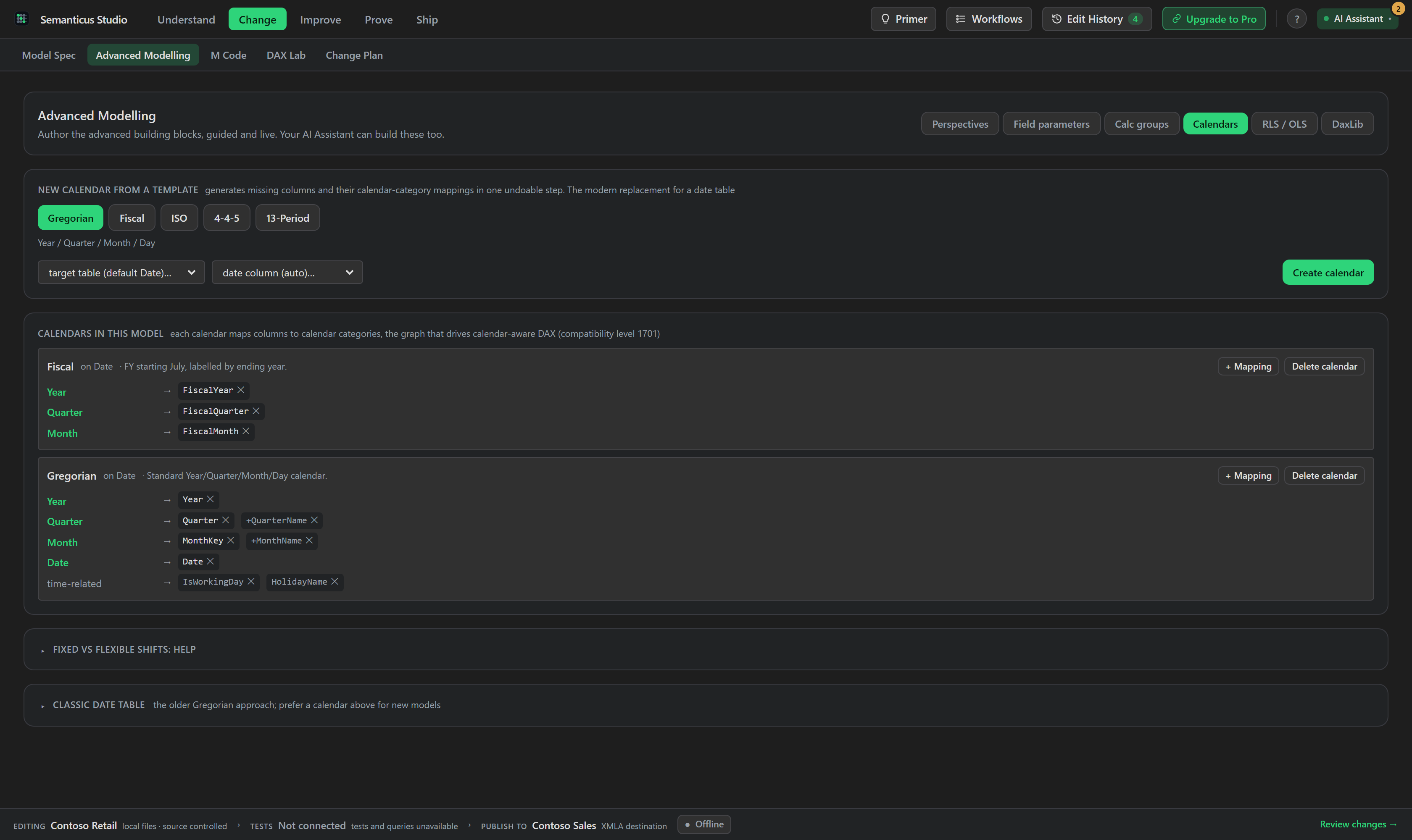
#In the Studio
The Calendars area (under Advanced Modelling) lists each table's calendars and gives you a mapping editor. Pick a column and assign it to a time unit (Year, Quarter, Month, Week, Date, and the recurring variants such as MonthOfYear and DayOfWeek), and drop untagged-but-time-related columns (like IsWorkingDay or HolidayName) into a time-related bucket. Template buttons scaffold a whole calendar in one step.
Because the calendar metadata is plain model metadata, Semanticus authors it directly whatever your editing setup, and a single date table can hold a Gregorian, a fiscal and an ISO-week calendar together over the same columns.
#Over MCP
The same calendars are dual-drive:
list_calendarsreads every calendar on the model (per table, each column-to-time-unit mapping and the time-related bucket) and reports whether the model's compatibility level supports calendars at all. It is a pure offline metadata read.define_calendarcreates a calendar and its column mappings in one undoable step.define_calendar_from_templatedoes the one-step setup: it generates the template's calculated date columns (only where they are absent) and the calendar mappings together. Templates aregregorian,fiscal(with a fiscal start month, labelled by the ending year),iso(ISO-8601 weeks),445(4-4-5 retail periods) and13period(thirteen four-week periods).tag_calendar_columnedits a single mapping incrementally, anddelete_calendarremoves a calendar (the columns themselves are left untouched).- Pair calendars with
generate_time_intelligence, which writes a suite of time-intelligence measures (YTD, QTD, MTD, PY, YoY, YoY% and opt-in variants) for a base measure against a given date column.
list_calendars                                    # -> calendars + whether CL supports them
set_compatibility_level  1701                     # if needed (a one-way upgrade)
define_calendar_from_template  table:Date  template=fiscal  fiscalStartMonth=7
# then author calendar-aware DAX: TOTALYTD([Total Sales], 'Fiscal')#The classic path is still there
generate_date_table and mark_date_table remain for classic, Gregorian-only
date tables (existing models are real), but they are the legacy approach: their own tool descriptions
point to define_calendar_from_template for calendar-based time intelligence. If you are
building a new model on a recent compatibility level, prefer calendars, calendar-aware YTD can even
outperform the classic date-column form in grouped-by-week scenarios.
list_calendars tells you whether the current model qualifies; if not,
set_compatibility_level raises it. Upgrades are one-way, and redeploying an upgraded
model to an older runtime may fail, so raise the level deliberately.