 Semanticus
Workflows
Enforced, evidence-verified playbooks. A workflow is markdown steps plus gates, and the gates are not checklists: they collect answers and run real engine checks against your live model. Think of them as MCP skills with teeth. Reading a playbook is free; running one with enforcement is Pro.
An instruction an assistant can ignore is a suggestion. A workflow gate is a wall the engine holds: the step does not pass until the required inputs are answered (or explicitly declined with a reason) and the verify checks actually run. The result is a repeatable, accountable way to perform a task, whether a person or an AI assistant is at the controls.
#In the Studio
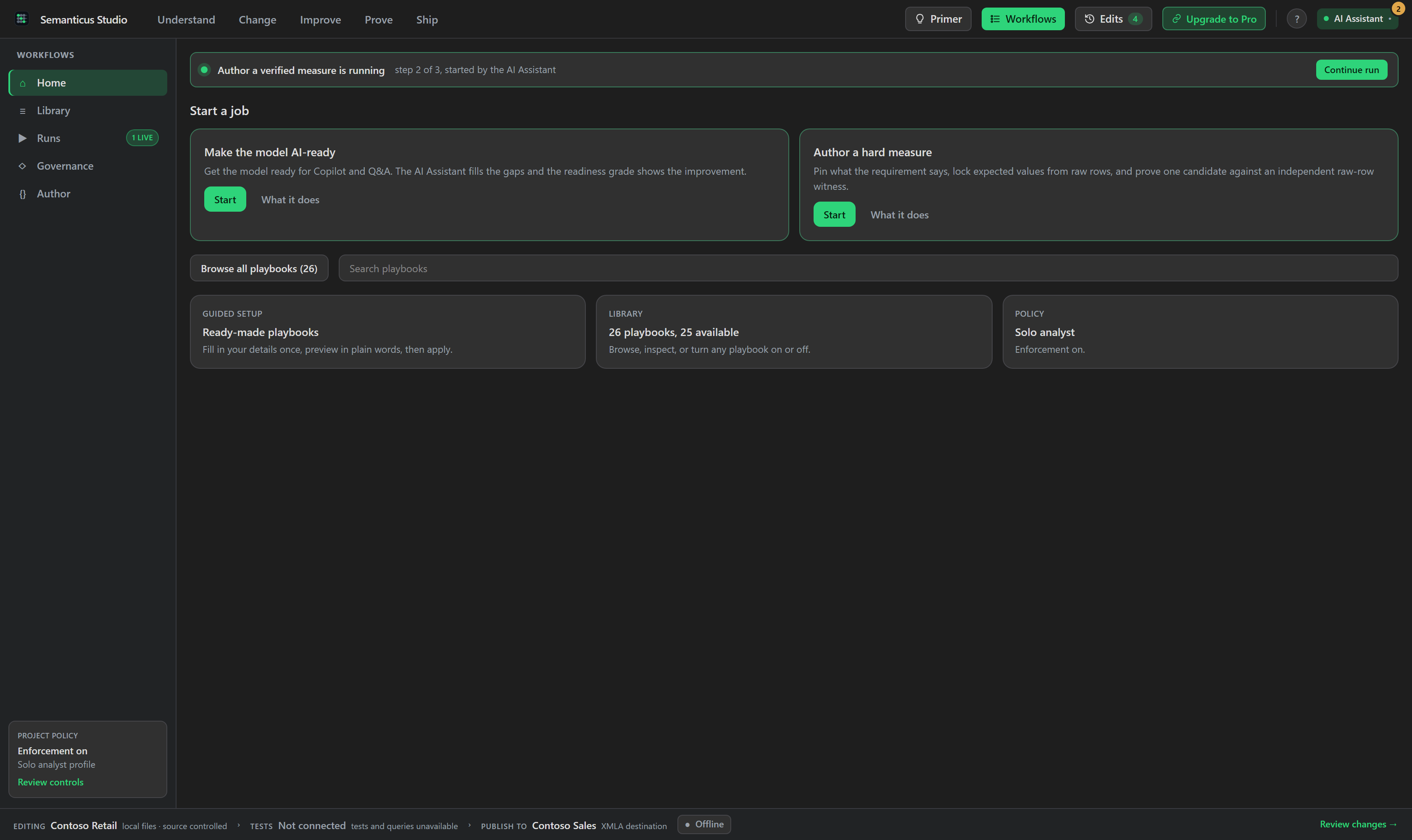
The Workflows tab has two modes. Run mode shows the library rail (stock and your own workflows, each with a gated-or-free pill and its triggers), a step rail, and a gate panel where you answer or decline each question, submit, and watch the engine record its verify evidence (a rejection quotes the exact unanswered questions). Design mode builds a workflow as a chain of step cards, with action chips drawn from the live tool catalog so they cannot drift, and emits the markdown file deterministically (the file stays the artifact).
#Switch a complete workflow profile
A profile activates a named set of workflow settings together. Teams can move between a normal working profile, a stricter production profile or their own saved profile without changing each workflow by hand. The active profile is visible in the Workflows tab and to the AI Assistant.
#Author a hard measure
The featured workflow and the library workflow use the same optimized playbook. You state the business result and may name a likely DAX pattern. The run then pins the edge convention, authors one candidate, checks it across an adversarial context grid, and compares it with an independent calculation over raw rows. Equivalence is a hard gate. Performance work is optional and happens only after correctness is proven. Starting from the featured card does not add a second questionnaire or a different workflow.
#Three ways to control a workflow
Beyond running a workflow, the tab gives you three independent switches over how the library behaves for your project. Each is a live control in the Workflows tab, and each flips the same way whether you use the tab or ask your AI assistant. Flipping one never changes the others.
- Turn a workflow on or off. Every workflow in the library rail has an on/off switch. Off means the engine refuses to start it until you switch it back on; it stays listed, dimmed, with the switch right there, so you are never stuck without a way back. Free. Example: switch off a retired playbook so nobody starts it by accident.
- Require a workflow for an action. Select a workflow and its "Required for" panel lets you require that an authoring action, such as New measure, always goes through it. Set it to hard and a bare New measure is refused and pointed at the workflow; set it to warn and the bare edit is allowed but recorded as a compliance note. Setting a hard or warn requirement is Pro; clearing the last one is free.
- Hide a workflow unless a condition holds. Select a workflow and its "Hide when"
panel lets you type a condition and click Apply rule; there are example conditions
to drop in, and a Clear button to remove the rule. The rule is always written as a condition to hide
by, never a condition to show by, so "show it only at month-end" is written as "hide it when it is
not month-end" (for example, hide
deploy-freeze-guardwhen you are more than three days out from month-end). Conditions are simple facts the engine already knows: today's date, the connected workspace, the git branch, how big the model is, whether it has row-level security, its readiness grade, and whether you are on Free or Pro. The panel tells you in plain words whether the workflow is on the menu right now or hidden, and why. A workflow hidden this way can still be started on demand right from the tab (the run records a note), and a workflow required by a binding is always shown no matter what any hide rule says. Writing a rule is Pro; reading and clearing one are free.
#Over MCP
Reading and following a playbook is free; the enforced run is the paid part.
list_workflows                         # the library: step count, gated/free, parse errors
get_workflow new-measure               # the full definition: instructions, gate inputs, verify checks
start_workflow new-measure             # begin an ENFORCED run (Pro when any gate enforces)
list_workflow_profiles                 # available project profiles and the active one
activate_workflow_profile              # switch the complete profile in one reviewed action
get_workflow_run                       # the live run state + the current step's questions
submit_workflow_step answers={...}     # submit; the ENGINE runs the verify checks
skip_workflow_step reason="..."        # accountable skip (a reason is recorded)
abort_workflow                         # stop; the partial record is preserved as data
list_workflows and get_workflow are free (the funnel): use them to follow a
playbook manually, or to preview what a run will enforce. start_workflow is the one Pro
chokepoint when any gate enforces (a workflow whose gates all resolve to off runs free). The finished
run's full record (answers, declines, evidence) is appended to your experience log.
#How a gate verifies
The engine evaluates every gate, never the assistant. A step's verify checks are run against the live model and include:
- DAX probes: a value you supply as known-good is compared to the measure's live result.
- Equivalence proofs: a rewrite is proven to return identical values to the recorded
original across a filter-context grid before it is accepted. Both sides are now evaluated in the
measure-faithful shape (a deployed
DEFINE MEASURE), so a proof carries the implicitCALCULATEa real measure would. - Expected-value anchors: the
expected_valueskind proves a measure reproduces a set of locked value anchors (each a context plus its committed number), compared at a gold-style tolerance where BLANK matches only BLANK, and locked with a revision receipt so a later change to the accepted values is admissible only with typed evidence. - BPA-clean and readiness-rescan diffs: the active findings are diffed against a start-of-run snapshot, so a step is judged on what it changed, never blamed for pre-existing violations.
- Benchmark budgets: a query's measured cost is checked against a budget.
Answers accumulate across the run, so a later step's probe can reference a value recorded earlier. Every input is answer-or-decline, and a skip with a recorded reason is the only audited override. Verify outcomes are fail-closed: passed is proven, failed produced evidence that did not meet the gate, not_applicable means the check's condition did not hold and the step advances legitimately, and unavailable means the check applies but has no authoritative evidence (offline, a missing witness, zero coverage, truncation, candidate drift). An unavailable check blocks a hard step exactly like a failure and names what was missing, so a gate is never quietly passed on absent evidence. The run's shape ledger, evidence receipts and history are immutable.
#Strictness and the enforcement toggle
Each gate resolves to a strictness: hard (a failure blocks the step), warn (it is recorded and the step passes), or off (skipped). Above all of that sits a model-wide enforcement toggle, the accountable owner's kill-switch:
get_workflow_enforcement               # read the model-wide mode
set_workflow_enforcement mode=off      # turn every gate off for quick tasks (ask the user first)
set_workflow_enforcement mode=default  # restore each workflow's own strictness
When enforcement is off, every gate is skipped with an honest note, runs record no verified evidence, and gated workflows start free. The setting is persisted beside the model and re-broadcasts the library so both doors see the gated flags flip.
#The stock library
Semanticus ships 15 stock playbooks beside the engine, authored from the semantic-model journey: from
new-measure, import-table, make-ai-ready and
deploy-to-production through optimize-dax (a hard equivalence gate on the
recorded original) to verified-measure, rebuilt in 1.1.0 into the anchor-and-witness form the
benchmark rewards: conventions pinned from the requirement's own words, expected values locked as anchors,
and an independent witness, the benchmarked step up from a plain new-measure. The rest of the library covers add-relationship,
calendar-setup, time-intelligence-variants,
refactor-to-calculation-group, incremental-refresh-setup,
governed-rename, model-hygiene-pass and secure-with-rls. Each
workflow carries a short when-to-use hint so your assistant picks the right one for the job. A stock
workflow is read-only; opening one to customise it creates a copy in your project's
.semanticus/workflows that shadows the stock version, and deleting the copy reverts to
stock.
#Curate the menu, require a workflow
Three per-project controls shape how the library is used, all persisted beside the model and applied to both doors:
set_workflow_enabled name=... enabled=false   # take a workflow off the menu (still listed, easy to re-enable)
set_workflow_binding op=create_measure ...    # require a workflow for a task: bare edits are routed to it
set_workflow_activation workflow=... when=... # show a workflow only when a condition holds (below)
get_workflow_policy                           # one call: what is enabled, active, gated and required here
A required workflow means a bare operation (say, create_measure) is refused with a plain
explanation and pointed at the playbook; the edit is welcome at the workflow's own authoring step. The
requirement reads independently of the strictness toggle, so relaxing gates for a quick task never
silently removes a team mandate. Requiring a workflow is Pro; curating the menu is free.
#An active menu: show a workflow only when it applies
Beyond on and off, a workflow can carry an activation rule: a plain condition that decides whether it
appears on today's menu. Show deploy-freeze-guard only in the last days of the month, or a
production checklist only when the connected workspace name contains "prod".
set_workflow_activation workflow=deploy-freeze-guard when="date.monthEndOffset >= -3"
set_workflow_activation workflow=deploy-to-production when="connection.workspace ~ '*prod*'"
set_workflow_activation workflow=...                   # no condition: clears the rule
Conditions are written over facts the engine already knows: the date, the connection (workspace name,
connection kind), the git branch, the model (table count, readiness grade, whether it has row-level
security) and the session, joined with and/or. Activation curates the menu, it does not lock it: a
workflow hidden by a rule is still startable on demand (with a note naming the rule), a required
workflow is always shown, and a live run survives a rule flipping mid-run.
get_workflow_policy reports every rule plus any contradictions it finds (an unknown
workflow, a rule that can never fire, a conflict with a requirement). Writing an activation rule is
Pro; reading the menu is free.
#Authoring your own
A workflow is a skill definition: gate-free means pure instructions (it runs free), and gates make it
Pro-enforced. Author or edit one with save_workflow, which parse-validates first: a file the
parser refuses is never written and the error comes back verbatim.
save_workflow name=... markdown=...    # parse-validate then write (a bad file is never saved)
check_workflow name=...                # admission dry-run: resolve triggers/ops + gate inputs
replay_check_workflow name=...         # rehearse each step op through dry_run, model untouched
delete_workflow name=...               # remove a user workflow (a shadow reverts to stock)
check_workflow is the admission dry-run: it parses the file, then statically resolves it
against the live tool surface and its own gate inputs (every referenced op must be real, and every verify
must name an input some gate collects). replay_check_workflow goes further and rehearses
each step op through dry_run, so the model is never touched. Both are free and read-only.
#Templates: playbooks with blanks
A template is a workflow with blanks (called slots) that you fill with your own process: your KPI definitions, your close checklist, your freeze window. In the Studio, the Templates shelf on the Workflows tab opens a fill-in form generated from the slots; over MCP the same five operations do it by name. Filling one produces a real, runnable workflow that carries a "from template" badge and remembers what it was made from.
list_workflow_templates                 # the shelf: stock templates + your own
get_workflow_template name=...           # read one, including the blanks to fill in
instantiate_workflow_template ...        # fill the blanks, get a runnable workflow
save_workflow_template name=...          # save your own template (validated before it is written)
delete_workflow_template name=...        # remove a template you added
The fill is deterministic and structure-preserving: your answers change only the wording, never the
checks the workflow enforces. A slot value that would smuggle in an extra step, a different check or a
weaker gate is refused with a plain explanation naming the slot. Semanticus ships three stock templates
to start from: metric-certification (certify a measure against your definition of done),
month-end-close (your close checklist as an enforced run) and
deploy-freeze-guard (a guard for your deployment freeze window). All five template
operations are free: a template is content, and what Pro sells is still the enforced run.
Listing, reading and manually following any playbook is free, and so is authoring and checking your own. Enforced runs (the engine-verified gates) are Pro. See Pro.