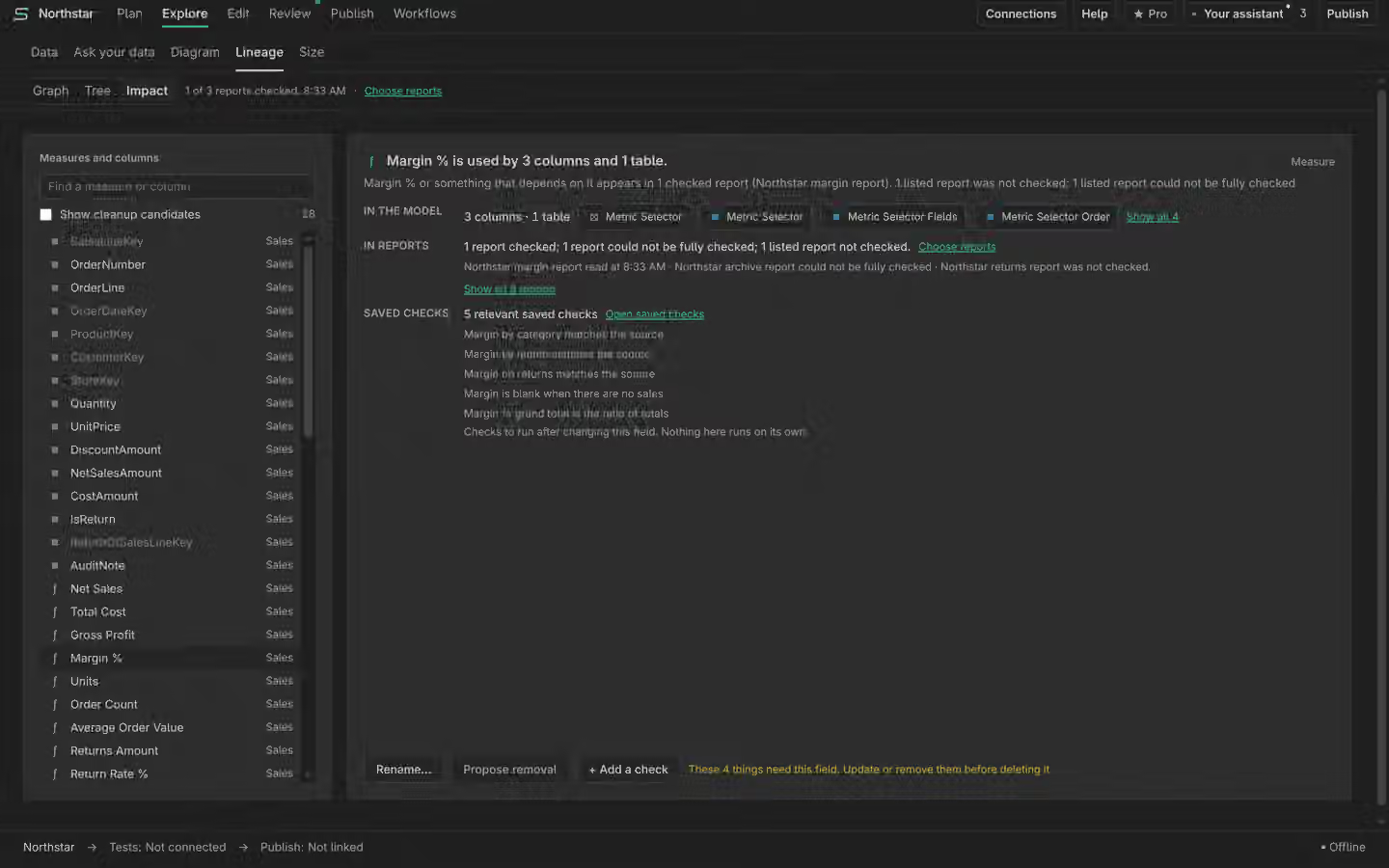
Lineage & Impact
Trace any field from its data source down to the report visuals that use it, see exactly what breaks before you change it, and find what is genuinely safe to remove. Built offline from your model, available in the Studio and over MCP.
Two questions this tab answers. Forward: "if I change or remove this, what downstream breaks?" Reverse: "which objects can I delete with zero impact?" The reverse question is the hard one, because a model-only "unused" check over-reports (a descriptive column a report displays looks unused, since no measure references it). Report-aware analysis closes that gap.
#In the Studio
The Lineage & Impact tab renders the dependency graph with a force-directed view plus DAG and tree layouts, and a drill-down that expands node by node from data source to table to column or measure to report, page, visual and the exact field. Two modes toggle: Impact highlights everything downstream of a selected object, and Safe-to-remove lists the deletion candidates. Nodes carry a reference count, an impacted count and, for the safe-to-remove sweep, the tri-state verdict with a "blocked by" badge naming what still uses an object.
#Over MCP
The same lineage is a tool surface, so your own Claude Code can answer "what breaks if I drop Sales[Discount]?" or "list the safely removable measures".
get_lineage # the offline lineage graph: nodes + directed edges
impact_of measure:Sales/Margin # forward: everything that breaks if this changes
get_dependencies <objRef> # what an object's DAX consumes (check before editing)
get_dependents <objRef> # what references it (check before delete / rename)
unused_objects # reverse safe-to-remove sweep (tri-state verdicts)
analyze_reports <pbip-folder> # report-aware: which fields each local report uses
get_lineage builds the graph offline from the model (TOM): data source to table, table to
column and measure, DAX dependency edges, and foreign-key to primary-key relationships. For the star
schema itself, model_graph_summary is the cheap first call and get_model_graph
the full graph.
#Impact of a change
Before you edit or delete a measure or column, impact_of returns everything that breaks
transitively: the DAX dependents (measures, calculated columns and tables, calculation items, KPIs, RLS)
plus, for a column, the relationships, hierarchies and sort-by columns that use it, with a breadth-first
depth and counts by kind. get_dependencies (direction dependsOn) lists what an
object's DAX consumes, and get_dependents lists what references it, so "check dependents
before delete" is one call.
#Safe-to-remove, conservatively
unused_objects is the reverse sweep: every measure and column that nothing references, as a
deletion-candidate list. It is deliberately conservative and gives a tri-state verdict per item so it
never overstates safety:
| Verdict | Meaning |
|---|---|
| safe | Nothing in the model references it. A column used by a relationship, hierarchy, sort-by or RLS filter is never listed here. |
| used by an unused object | Referenced only by other dead objects, surfaced with what blocks it, so you can retire the chain together. |
| caution | A dependent report could not be read, so the object is not declared safe. |
Safe-to-remove fails loud rather than guessing. If a report cannot be read, the verdict degrades to caution instead of claiming the object is unused. On its own the model-only sweep cannot see report usage, so a field used only by a published report will still appear as a candidate until you add report analysis. Verify report usage before you delete.
#Report-aware lineage
analyze_reports closes the model-only blind spot for local reports: point it at a Power BI
project folder in PBIR format and it parses which model fields each report actually uses, then recomputes
the safe-to-remove sweep excluding anything a report displays. Field references are reconciled to the
open model by name, so the model must be the one the reports bind to.
For published reports, analyze_cloud_reports does the same against the live service and
list_reports finds which published reports bind to the open model. Because the Fabric
report-definition API has no read-only scope, the cloud path requires a write-capable Fabric scope and an
explicit consent=true (the behaviour stays read-only: Semanticus never modifies a report).
Any report it cannot read (a paginated report, an encrypted sensitivity label, a download error) is
reported as unreadable with a reason, never silently dropped, so "safe" is never overstated. The deeper
cloud report layer is being finalized against a live tenant and is gated until that verification lands.
Lineage, impact and safe-to-remove analysis are in the free tier. See Pro for the one-click bulk engine that applies a reviewed batch of changes in one undoable transaction.
Semanticus