 Semanticus
Deploy
Review the exact model diff, validate the selection, then confirm the write. Push changes, roll back and promote share one clear publishing context and never infer permission from a connection.
#Working copy to publish destination
The header states what you are editing, where it will publish, whether drift has been checked and the latest restore point. Review is read-only. A write remains unavailable until the destination is explicit and the selected diff passes validation. If source and target are the same, Deploy reports that there is nothing to review.
#In the Studio
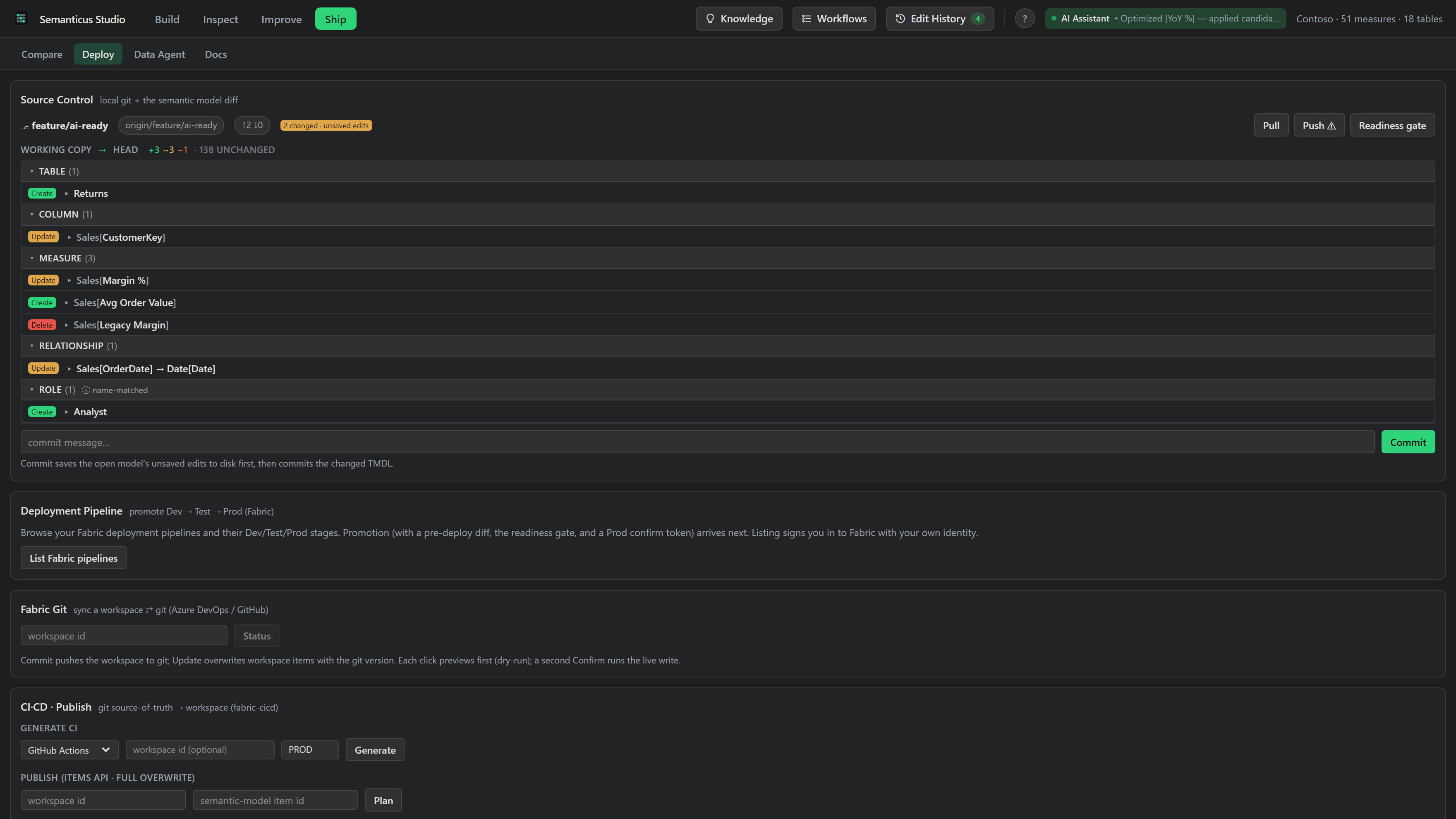
The Deploy tab brings together local source control, a semantic-model diff, Fabric deployment pipelines, and the readiness gate that runs before a live write. You see what would change first, always.
The gate runs the Best Practice and AI-readiness scans (and, against a target, the pending-change count) and returns pass or block, with the blockers listed. A red gate pauses the deploy; shipping anyway takes an explicit, recorded reason, so an override is an accountable decision, not a silent bypass.
You review a change set in the model diff before it ships, in whichever of its three modes suits the moment: a pull-request-style Review list you tick object by object, a Side by side word-level comparison of the before and after, or a Map that sizes each table by how much changed. A native status-bar item also shows what you are editing versus what you are querying while you work outside the Studio (a TMDL file, the model tree), and warns only when the two have provably diverged. See Compare for the diff view in full.
#Selective push to a published model
You do not have to ship a whole model at once. A push can target a published model over XMLA and carry just the objects you choose, object by object, the way you would land a reviewed pull request. Adds, updates and real deletes travel in one write.
- Real deletes, but never by accident. An object you explicitly tick for deletion is removed on the live model in the same write as the adds and updates. Absence never deletes: a normal deploy that ticks nothing removes nothing, exactly as before. Deletes are disclosed separately in the preview.
- An always-on drift guard, on both tiers. Just before it writes, the push re-checks the target. If an object you are about to change was changed under you since you diffed, it refuses and writes nothing, so you never silently overwrite a colleague's edit. Safety here is never paywalled.
- An accountable override. If you do mean to proceed through drift, it takes an explicit reason, and that reason is recorded on the audit trail before the push, not after. See Edit History.
- Matched by identity, not by name. Each object is resolved by its lineage identity, so a rename lands as a rename and a change never lands on an unrelated object that happens to share a name. If a target object was republished under you (a different object now wears the name), it is held back rather than overwritten.
- A restore point first. Every committed push writes a restore point before it touches the endpoint, and a push that contains deletes is refused outright if that restore point cannot be written. No restore point, no delete.
Previewing a push and pushing a single object are free. Pushing more than one object as one atomic, undoable batch is the one-click Pro operation, the same gate as every other bulk primitive. There is no production surcharge: deploying is free, and the drift guard and restore point are free on both tiers. See Pro.
#Over MCP (dry-run first, everywhere)
- Preview and gate:
preview_deployshows what promoting a model between pipeline stages would change (New versus Update per item) plus the gate;deploy_gateruns the readiness check on its own and returns pass/block. Both are read-only. - Pipelines:
list_deployment_pipelines,get_pipeline_stagesandget_stage_itemswalk a Fabric deployment pipeline's Dev/Test/Prod stages and resolve the item to deploy.deployment_historylists recent deployments. - Deploy:
deploy_stagepromotes items between pipeline stages anddeploy_livewrites the session's metadata edits back over XMLA, including creating a brand-new calculated table on the live model and recalculating it (new data-bearing tables are reported rather than silently dropped). Both are dry-run by default; a commit is a deliberate second step. Promoting to a deployment pipeline's production stage is always reserved for a human confirming from the Deploy tab, and your AI assistant can never commit that promotion. Which live metadata writes your assistant may commit is governed by agent permissions per the target's environment label: it just works on a dev target and asks first on production. - Selective push:
apply_model_diffcan target a published model (targetEndpoint+targetDatabase) and push only the objects inselectedRefs, ticked deletes included, with the always-on drift guard and a restore point written first. Dry-run by default;commit=truewrites, andoverrideReasonis the accountable way through a drift refusal. - Undo a push:
list_restore_pointsandrollback_pushput a published model back to a pre-push snapshot, with the rollback dry run listing what it would restore and remove first. See Restore points & rollback. Free at both tiers. - Fabric git:
fabric_git_connectionandfabric_git_statusread the workspace-to-git state;fabric_git_connect,fabric_git_commitandfabric_git_updatesync it, each dry-run by default. - CI/CD and export:
cicd_generatescaffolds a ready-to-run CI pipeline (a parameter file, a GitHub Actions or Azure DevOps workflow, and a deploy script);cicd_publishpublishes the on-disk definition to a workspace (dry-run by default; the live publish is human-only); andexport_vpaxwrites the model to a VertiPaq-Analyzer.vpaxfile for the wider analysis ecosystem.
deploy_gate                        # BPA + readiness -> pass / block + blockers
preview_deploy                     # what a stage promotion would change (read-only)
deploy_live                        # DRY RUN by default: reports the metadata diff
deploy_live  commit=true           # writes back over XMLA (gated by agent permissions)
apply_model_diff  targetEndpoint=<xmla>  selectedRefs=["measure:Sales/Total"]              # DRY RUN selective push
apply_model_diff  targetEndpoint=<xmla>  selectedRefs=["measure:Sales/Total"]  commit=true # push: drift-guarded, restore point first
rollback_push id=<id> # DRY RUN: what a rollback would restore + remove#The accountable checkpoint
When a live deploy commit runs, Semanticus runs the deploy gate first. If it comes back red, the deploy pauses with the blockers; shipping regardless takes an explicit override reason, which is recorded before the session is serialized and travels inside the artifact it authorized (the audit record ships with the model). It is never a hard wall on any door, and it is never a silent skip. See Edit History for the audit trail and Pro for the Verified Edits layer.
Every deploy, stage promotion, Fabric git sync and CI publish is a dry run by default and requires an explicit commit. A production pipeline promotion must be confirmed by a human from the Deploy tab, and which live writes your AI assistant may commit is set by agent permissions. Your assistant can always preview and rehearse the whole path; whether it commits, and where, is yours to decide.