Semanticus
Documentation

Agent permissions

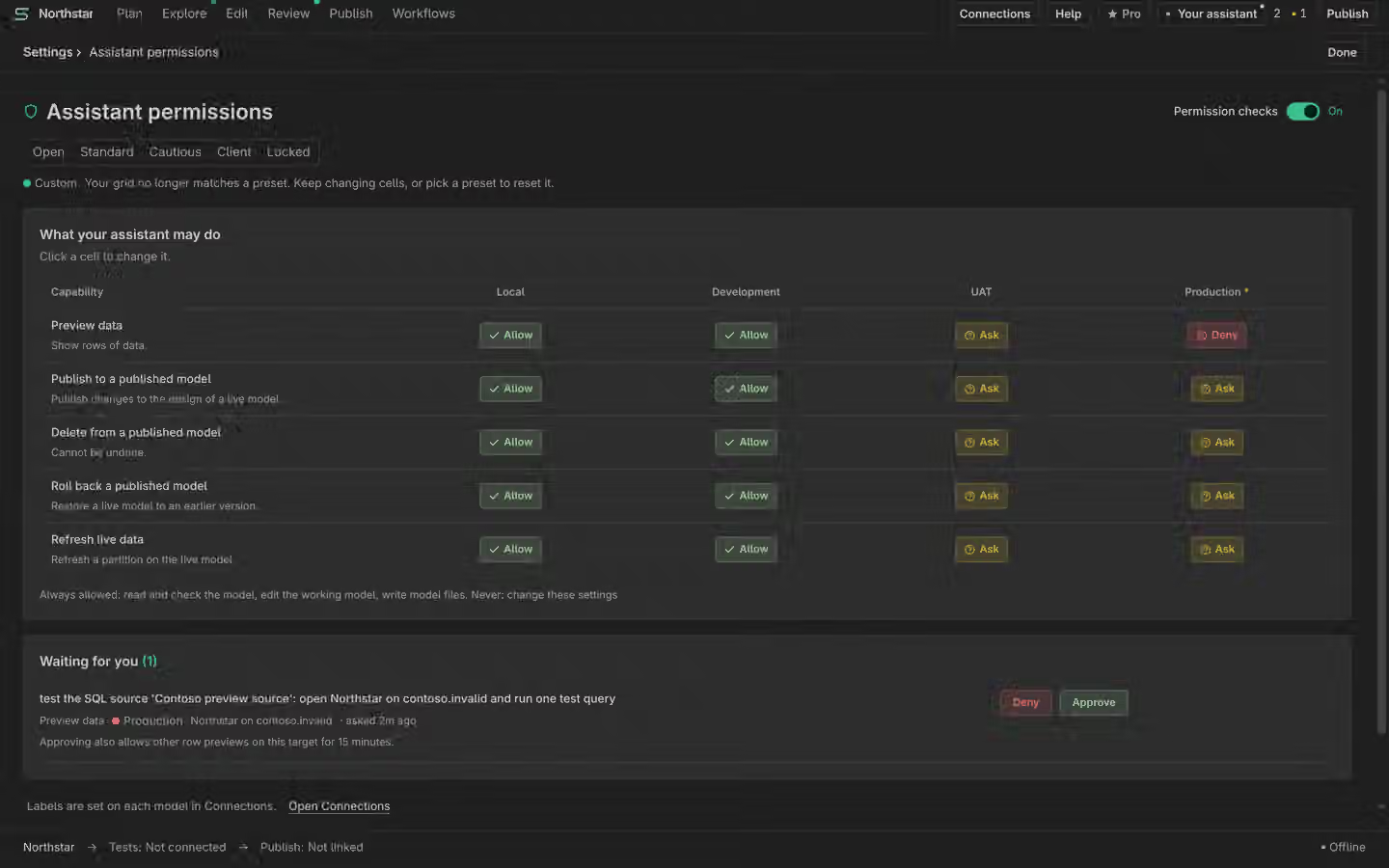
Semanticus gives your AI assistant real hands on a live model. Agent permissions is where you decide what those hands may do, per environment. It is a simple grid: a set of capabilities down one side, your environments across the top, and one of three answers in each cell. The whole guardrail is free. Configuring it is Pro. The global off switch is always free and always honest.

Capabilities by environment

Rather than list every operation (there are hundreds), the policy is written in terms of a short set of capabilities, grouped by what a mistake would cost you. Each capability that touches a live model is decided per environment label (local, dev, uat, prod), because the same action is fine on a sandbox and serious on production. The labels come from your connections, and an unlabelled target is treated as production.

CapabilityGated per environment?
Read the model, and run a calculation (a measure or scalar result)No. Always allowed, in every environment.
Edit your working copy, and save it to a fileNo. These never touch a live target, so they are always allowed.
Read rows of data from a target (a preview, a measure pivot, a row-returning DAX query, or the trace-and-log op)Yes.
Deploy metadata to a live modelYes.
Delete an object from a live modelYes, and it additionally requires a restore point.
Roll back a live modelYes.
Refresh a partition on a live modelYes.
Change the policy, or a target's labelNever the assistant's to do. Human only.

Every gated cell resolves to one of three answers:

Reading rows of data is the one gated capability with no dry run, because reading the rows is the action. Everything else that writes can be previewed freely, so your assistant can always show you what it would do before anything is gated.

Five presets

You pick a preset, and it fills the whole grid for you. The presets run from zero friction to maximum separation of duties. Standard is the default. The table below shows each preset's answer for a live write (deploy, delete, roll back or refresh), by environment.

PresetlocaldevuatprodIn a sentence
OpenallowallowallowallowZero friction. The assistant is unrestricted, even on production.
Standard (default)allowallowaskaskNothing is hard-blocked, so it just works, but a live touch on uat or production asks first.
CautiousallowaskaskaskAnything past your own machine asks first.
ClientallowaskaskdenyProduction is a wall. Everything else asks.
LockedaskaskdenydenyMaximum separation of duties. Even local and dev writes ask.

Previewing rows of data follows the same shape, with two presets tightening it further: Client allows a data preview on local and dev but denies it on uat and prod (never preview production rows), and Locked allows it only on local. Reading the model, running a calculation, editing your working copy and saving to a file stay allowed in every preset and every environment. Because an unlabelled target is read as production, Standard already asks before your assistant writes to an endpoint you have not classified.

Ask, and the Waiting-for-you queue

When a cell says Ask, the assistant cannot just proceed, and it cannot approve itself. It requests approval by attempting the action, which lands the request in a Waiting for you queue. You approve the specific action in the UI, then the assistant retries the same action and it goes through.

Every approval, and every denial, is recorded, so a privileged action is always an accountable one.

The global off switch

There is one switch for the whole guardrail. Turn it off and the matrix stands down: gated actions are allowed, and the product tells you plainly that enforcement is off rather than pretending to hold a line it is not holding. The off switch is always free and always available. If the guardrail is ever in your way, you should be able to turn it off honestly, not route around it.

The off switch does not lift the built-in safety gates

A handful of operations carry their own hard safety gates that predate this policy and are not cells in this matrix: an assistant still cannot promote to a deployment pipeline's production stage, force a workspace to overwrite from git history, or the like. Those belong to those operations. Turning the agent-permissions matrix off does not touch them.

Free and Pro

Safety is never paywalled. The whole guardrail is free: the default policy protects everyone from the first connection, and the global off switch is always free. What is Pro is configuring the policy, choosing a different preset or editing an individual cell. A Free user runs on the default Standard preset, which they cannot change, with the off switch always available.

What this is, and what it is not

Be clear about what agent permissions buys you, because it is worth being honest about. This is governance for your own AI assistant, and it stops accidents. It makes intent explicit, keeps a careless push off production, and leaves an audit trail for every privileged action. For the thing it is for, an assistant working on your behalf that you want to keep on a sensible leash, it is a real and useful control.

It is not a security boundary against a hostile agent

Your AI assistant is your own AI Assistant, running on your machine with the access you gave it. It can read and write files directly, so a determined, misbehaving agent is not what this defends against. The policy raises the floor against mistakes; it is not a wall against malice.

The real boundary for production is the credential you give it. An assistant with no write credential for production cannot write production, whatever any policy says. Use a separate service principal per environment and grant the assistant only the access each environment should have. That is the boundary that actually holds, and agent permissions sits on top of it to catch honest mistakes and record intent.

Two things make the guardrail hard to defeat by accident rather than by intent: the policy lives in your user profile (not in the model repo the assistant edits), and denials are recorded, so the fence cannot be quietly found and stepped over without a trace. An unrecognised value in the policy, or a policy file that cannot be read, fails closed: live actions are denied until you repair it, never silently allowed.

Reading rows is gated across every path, with one honest caveat

The read-data gate covers every way the assistant can pull rows from a target, not just the dedicated preview. A row-returning DAX query (run_dax with an EVALUATE over a table), a table preview, a measure pivot, the trace-and-log diagnostic op, and any query the assistant runs while interviewing the model all take the read-data permission for that target. Only a scalar calculation (a measure or single-value result) stays ungated, because it is a calculation, not a row read.

The one honest caveat: a few calculation checks can still surface the category labels they group by, as bounded diagnostic context, the same way any measure can serialise a value through a calculation. So "the assistant reads no rows" is a strong default, not an absolute data-isolation boundary. Where withholding production data from the assistant is a hard requirement, rely on the credential boundary above, not only on this gate.

Over MCP

Your assistant can read the policy and its own pending approvals, but it can never change the policy or a label. Both reads are free.

get_agent_policy                    # the switch, the preset, the capability-by-label matrix
list_pending_approvals              # what the assistant is waiting for you to approve
# changing the policy or a label is human-only, from the UI