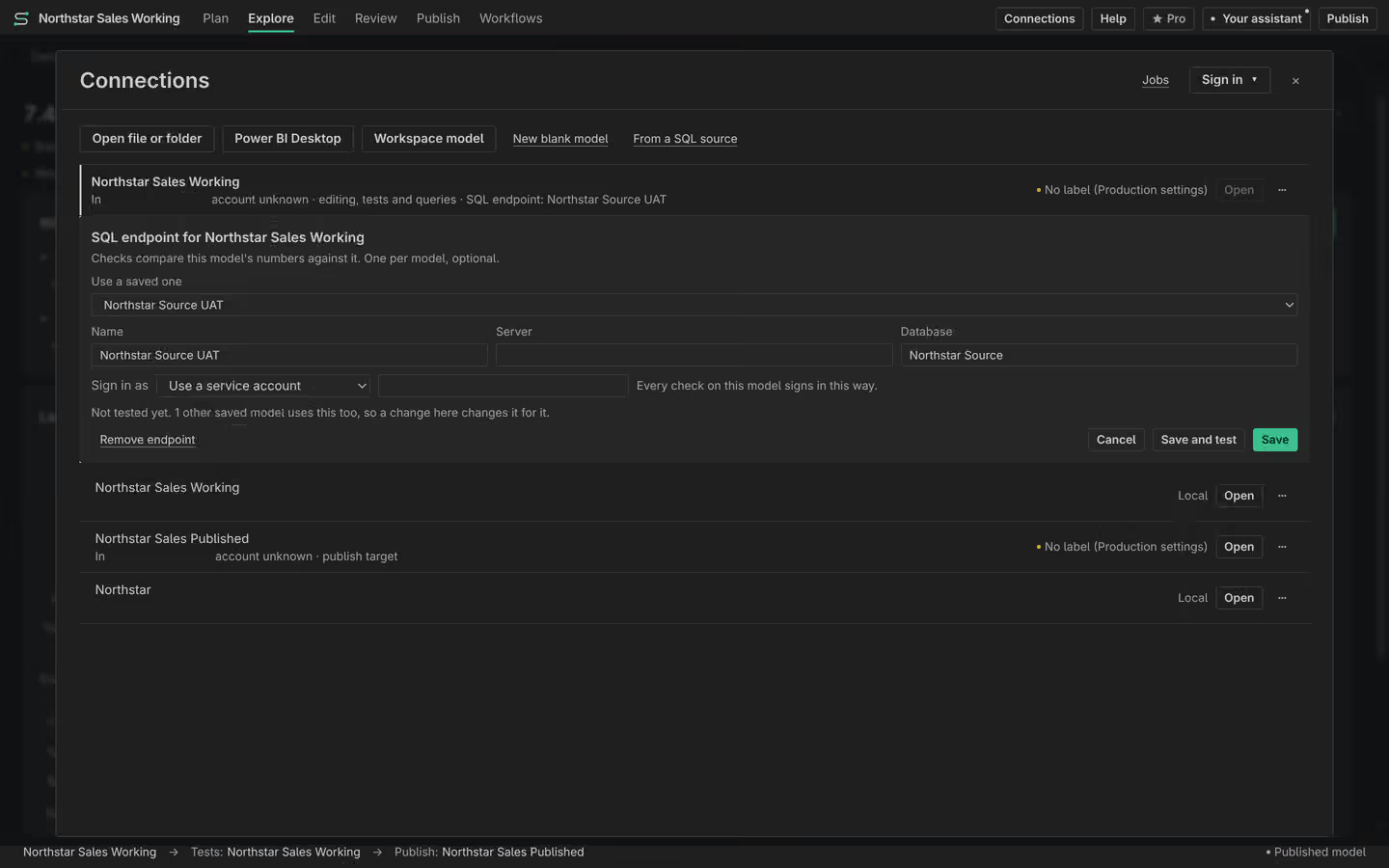
Connections
Open a local model, Power BI Desktop or an XMLA endpoint, then keep editing, testing and publishing destinations clear. Semanticus remembers endpoints without storing their secrets.

#Three separate contexts
Semanticus keeps three jobs separate so a live connection is never mistaken for permission to write:
- Editing is the model currently open in the workbench.
- Testing is the live model used for DAX queries, statistics and verification.
- Publishing is the destination selected in Deploy. It remains read-only until you review the diff, validate the selection and confirm the write.
A local working copy can be prepared from a live model. You edit the copy, test against a live endpoint, and choose the publish destination explicitly when the work is ready.
#One connection history
Every model source you connect to is remembered in one durable list: XMLA endpoints for published Power BI, Fabric and Azure Analysis Services models, and local Power BI Desktop instances, newest first. Every surface reads the same list, the Compare and Deploy tabs, the connect bar, and the open flow, so reconnecting to a model you used last week is a pick from a list rather than a path you paste from memory.
Each record carries the endpoint, the dataset, the model name, the authentication mode, when you last used it, and the target's label. It can also remember a working folder, the durable local copy you edit offline while querying the live model. The list is reachable from both doors, so your AI assistant can offer you a known endpoint instead of asking you to type one.
A connection record stores the authentication mode (a name such as your Azure CLI login, an interactive sign-in, or a service principal), never a token. Credentials stay in the encrypted credential cache, keyed by your identity rather than by the endpoint. Forgetting a connection forgets the endpoint, its mode, its label and its working folder, and nothing else.
#A label says what a target is
The engine cannot tell whether an endpoint is a personal sandbox or the company's most important model. Only you know that. So a connection is where you declare it, with one of four labels:
| Label | What it means |
|---|---|
local | A model on your own machine (an open Power BI Desktop, a file you are editing). |
dev | A development workspace where you expect to make changes freely. |
uat | A test or acceptance workspace where changes want a second pair of eyes. |
prod | Production. The model your reports and your organisation actually read. |
Labels are what make Agent permissions work. The permission matrix
is written in terms of these labels (what may your AI assistant do to a dev target, versus a
prod one), so the label on a connection is the single fact everything else is gated on.
#An unlabelled target is treated as production
If a target has no label, Semanticus treats it as production. This is deliberate, and it is the strictest reading available. An endpoint nobody has classified is not "probably fine", it is the one nobody has thought about, so it gets the most careful handling until you say otherwise. This is the only inference the product ever makes about a target's risk.
Semanticus never reads a label out of an endpoint's name. One real client's UAT_SEM is
their day-to-day dev workspace; somewhere else, SEM_TEST is what the board reads every
Monday. A name is a naming convention, not a fact about risk. The label is something you set, so the
product is never wrong about which model matters because someone named a workspace oddly.
#Setting a label, and who can
You set a label from the UI, and only a person can. Because the agent's own permissions are gated on the label, letting your AI assistant relabel a target would let it walk around the very matrix that restrains it, so labelling is refused from the agent door by design. The assistant can read the labels and explain why an action was blocked, but it cannot change one.
You do not have to label everything up front. The first time an action is refused because a target is unlabelled (and therefore treated as production), the refusal names the exact endpoint and gives you an inline way to label it there and then. The feature teaches itself at the first moment it matters, rather than demanding a setup pass before you can begin.
#Over MCP
list_connectionsreturns every remembered model source, newest first, with its endpoint, dataset, auth mode, model name, last-used time and label. Read-only and free. Your assistant uses this instead of asking you to retype an endpoint.label_connectionis refused from the agent door on purpose. It exists so the assistant can point at the exact target that needs a label and ask you to set it, not so it can set one itself.forget_connectionremoves a target from the remembered list. It does not disconnect anything. Reconnecting to the same endpoint records it again as unlabelled, which means it is treated as production until you label it.
list_connections # newest first, with each target's label
# label_connection is human-only: set a target's label from the UI
forget_connection id=<id> # forget an endpoint (re-adds unlabelled = prod)
Semanticus